1

I'm sharing Ubuntu One with my girlfriend, who has the same smartphone as me.

As a result both the phone's pictures end up in the same folder.

Is there a possibillity to use different folders?

Marco
  • 11
  • 1
  • You change the name of the uploads directory from the app on the phone. This is a duplicate of [this question](http://askubuntu.com/questions/72647/change-name-of-mobile-android-device) Have a look and see if that solves it for you. – Tom Brossman Feb 12 '12 at 16:22
  • @TomBrossman - whilst the solution maybe similar, I think the question is possibly different enough to warrant not marking this as a duplicate. Please can you add an answer with as much detail as possible? – fossfreedom Feb 15 '12 at 15:25
  • @fossfreedom good point, it's done. – Tom Brossman Feb 15 '12 at 22:20

1 Answers1

2

No problem at all. The answer is to make new destination folders your Ubuntu One directory on the computer, then point the phone app at these new folders on both phones.

  • First, add the desired folder(s) inside your /home/Ubuntu One/ folder on the computer, like this:

Ubuntu One destination folders

  • Now, open up the Ubuntu One Files app on the phones. You should see the folders you just created on the list, like this:

Android app screenshot

If you don't see the folders, touch the 'two arrows in a circle' icon on the right of the orange bar above to force a sync.

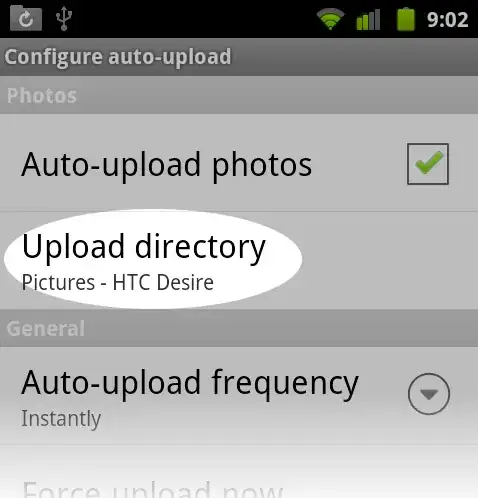
  • Now, press 'Menu' on the phone, and select 'Configure auto-upload'

Android app screenshot 2

  • Next, select 'Upload directory'

Android app screenshot 3

  • On either phone, select the different directories. That's your save location now.

Thanks to karni for the instructions posted in this question, it's what I based this on.

Tom Brossman
  • 12,953
  • 11
  • 66
  • 134