11

I would like to install the Electrum Bitcoin Wallet on Ubuntu 12.10. The Linux instructions are located at http://electrum.org/download.html and say:

Install python-qt4 and pip:

sudo apt-get install python-qt4 python-pip Install electrum:
sudo pip install http://download.electrum.org/download/Electrum-1.7.3.tar.gz#md5=22a35b0816f7c6c59fbeddb50e832ada

Run:

electrum

It seems the python interpreter is already included with Ubuntu. If I open a terminal and put in

sudo pip install http://download.electrum.org/download/Electrum-1.7.3.tar.gz

it says

sudo: pip: command not found

So how do I install python PIP or are there any other ways to install Electrum?

Thank you.


UPDATE: I managed to install Python-Pip from this link (using Method # 2. I could not find "easy_install" from Method # 1)...

After that I could install ELECTRUM. Great so far !!

BUT, I presume that because I'm using the "Try Out" (not the "Install") version of UBUNTU from a DVD-R, then if I reboot the computer I would have to go through the same long-winded procedure again to install Python-Pip and then ELECTRUM.

So, is there any way of adding ELECTRUM (and presumably Python-Pip) to the UBUNTU DVD-R so I can carry the DVD-R anywhere and use any PC to run ELECTRUM?

Zanna
  • 69,223
  • 56
  • 216
  • 327
user3352
  • 121
  • 1
  • 1
  • 4
  • Welcome to askubuntu, I am glad things worked out for you. If you have an additional question please start a new Q&A instead of editing your old one with it. – Glutanimate Apr 14 '13 at 11:17
  • A request to sync the electrum package from Debian testing has been filed, see https://bugs.launchpad.net/ubuntu/+bug/1229843 and add "affects me too" accordingly. – MagicFab Sep 25 '13 at 16:47
  • 2
    **DO NOT** use the literal electrum versions pasted in this thread. Make sure you get the latest version of the pip package from https://electrum.org/#download. – ccpizza Jul 11 '16 at 17:51

6 Answers6

7

I just tried it on 12.10, and it worked. Try running this: just press Ctrl+Alt+T on your keyboard to open Terminal. When it opens, run the commands below.

sudo apt-get update && sudo apt-get upgrade

Then run the steps below in Terminal in the exact order:

  1. sudo apt-get install python-qt4 python-pip

  2. sudo pip install http://download.electrum.org/download/Electrum-1.7.3.tar.gz#md5=22a35b0816f7c6c59fbeddb50e832ada

  3. electrum

enter image description here enter image description here

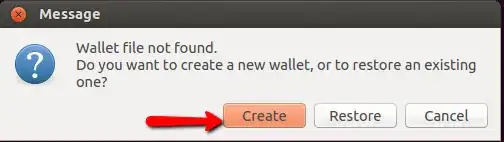
Once I ran electrum from terminal, I got a window that opened, and I clicked on create, and took me through the steps of creating a wallet.

enter image description here

Mitch
  • 106,657
  • 24
  • 210
  • 268
  • 2
    Thanks for your answer. So is there a way of adding ELECTRUM to the UBUNTU DVD-R to use in "Try Out" mode, so I don't have to go through the install procedure every time I use the DVD-R? – user3352 Apr 14 '13 at 06:30
  • @user3352 If you have a NEW question, please ask it as such by clicking the "Ask Question" button at the top of the page. – gertvdijk Jul 24 '13 at 17:32
  • You switched the order of sudo apt-get upgrade and sudo apt-get update. You should do update first and then upgrade to get the desired effect. – HansHarhoff Jan 25 '14 at 16:17
7

You can install the snap from the store:

sudo snap install electrum

Or search for it in the software center.

elopio
  • 2,553
  • 1
  • 17
  • 20
  • // , This just worked for me. – Nathan Basanese May 11 '19 at 02:01
  • That snap is very out of date now: https://snapcraft.io/electrum last updated 2017 appears to be version 2.6.4 (latest today is 4.3.4). Appears to rely on Python 2 and blows up with `TypeError: unsupported operand type(s) for *: 'NoneType' and 'int'` on Ubuntu 22.10. Best avoided. – Ciro Santilli OurBigBook.com Apr 10 '23 at 08:43
2

Electrum specifies to only download from their website, and it's easiest to install on Linux with an appimage: https://electrum.org/#download

After downloading use chmod +x on the appimage file and then run it as so:

nicholas@mordor:~/Downloads$ 
nicholas@mordor:~/Downloads$ ls -alh electrum-4.1.5-x86_64.AppImage 
-rw-rw-r-- 1 nicholas nicholas 54M Dec 27 19:29 electrum-4.1.5-x86_64.AppImage
nicholas@mordor:~/Downloads$ 
nicholas@mordor:~/Downloads$ chmod +x electrum-4.1.5-x86_64.AppImage 
nicholas@mordor:~/Downloads$ 
nicholas@mordor:~/Downloads$ ls -alh electrum-4.1.5-x86_64.AppImage 
-rwxrwxr-x 1 nicholas nicholas 54M Dec 27 19:29 electrum-4.1.5-x86_64.AppImage
nicholas@mordor:~/Downloads$ 
nicholas@mordor:~/Downloads$ ./electrum-4.1.5-x86_64.AppImage 
Warning: Ignoring XDG_SESSION_TYPE=wayland on Gnome. Use QT_QPA_PLATFORM=wayland to run on Wayland anyway.
nicholas@mordor:~/Downloads$ 
Ciro Santilli OurBigBook.com
  • 26,663
  • 14
  • 108
  • 107
Nicholas Saunders
  • 1,054
  • 4
  • 16
  • 37
2

This is working for me in 2017:

sudo apt-get install python-qt4 python-pip
sudo pip install https://download.electrum.org/2.7.17/Electrum-2.7.17.tar.gz

Also go to the Electrum Website for more information.

Zanna
  • 69,223
  • 56
  • 216
  • 327
1

Add PRO-API repository (http://proapi.ru/deb_repository/) on you system and install electrum deb package.

Lonkey
  • 21
  • 2
1

Commands to install electrum are (sudo pip install --upgrade pip is optional and -y forces yes)

sudo apt-get install python-qt4 python-pip -y
sudo pip install --upgrade pip -y
sudo pip install https://download.electrum.org/2.8.2/Electrum-2.8.2.tar.gz -y
Zanna
  • 69,223
  • 56
  • 216
  • 327