4

I'm here at Starbucks in Kingwood, Texas at the intersection of Kingwood Drive, and West Lake Houston. I'm in a shopping outlet. In the same shopping center just 150 feet away is an ATT Store.

The problem I'm encountering is both the Starbucks, and the ATT Store broadcast as ESSID attwifi. Unfortunately, they both have two different methods of web-authentication/guest login, and even more unfortunately is one of them is quite normally out of range; I can just barely get the signal. How do I black list an access point (the one from the ATT Store) from nm-applet? Or, how do a force an AP (the one here at Starbucks) in iwconfig that won't revert based on ESSID?

Evan Carroll
  • 7,376
  • 15
  • 53
  • 87

1 Answers1

3

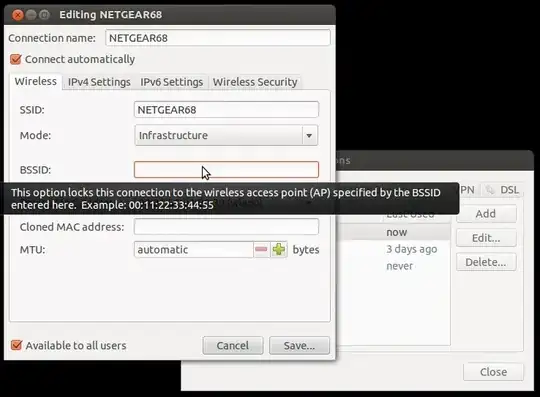
You should be able to do this from the GUI network manager applet by choosing Edit connections..., choosing the Wireless tab, selecting the appropriate connection by SSID, and then entering the MAC address of the desired access point in the BSSID box

network-manager bssid

You can obtain the MAC addresses from the command line using the nmcli tool e.g.

nmcli dev wifi list

or to see just the MAC of the currently active connection

nmcli dev wifi list | awk '$NF ~ /yes/ {print}'


It should be possible to do the same with iwconfig - although it generally requires elevated privileges e.g.

sudo iwconfig wlan0 ap 00:11:22:33:44:55

If nmcli is not available on your system, you can use iwlist to obtain the MAC information (although the output format is not as convenient for parsing)

iwlist wlan0 scan[ning]

(where wlan0 is the interface name) will show the current AP; or to see all detected APs

sudo iwlist wlan0 scan[ning]
steeldriver
  • 131,985
  • 21
  • 239
  • 326