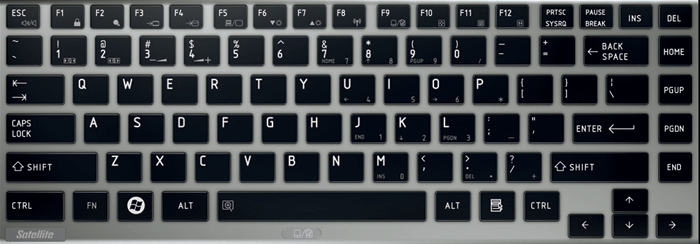
I'm trying to use MS-Office 2010 (I know... it's pretty old) with Wine and everything but my dead keys are not working perfectly.
With any other application in Ubuntu 16.04 they works well...
To clarify and give some examples:
- This is my physical keyboard layout "Toshiba Portegé-z835 keyboard"
- It has been logically configured as pt_BR, USA International with dead keys. This configuration allows it to work perfectly in any application, e.g: Chrome, gedit, atom, terminal, etc.
- When running MS-Office apps with PlayOnLinux and Wine, I try to use some of the following keys: ', ", ~ or `; but nothing happens. It seems that they are ignored.
My current locale is:
LANG=pt_BR.UTF-8
LANGUAGE=pt_BR:pt:en
LC_CTYPE="pt_BR.UTF-8"
LC_NUMERIC="pt_BR.UTF-8"
LC_TIME="pt_BR.UTF-8"
LC_COLLATE="pt_BR.UTF-8"
LC_MONETARY="pt_BR.UTF-8"
LC_MESSAGES="pt_BR.UTF-8"
LC_PAPER="pt_BR.UTF-8"
LC_NAME="pt_BR.UTF-8"
LC_ADDRESS="pt_BR.UTF-8"
LC_TELEPHONE="pt_BR.UTF-8"
LC_MEASUREMENT="pt_BR.UTF-8"
LC_IDENTIFICATION="pt_BR.UTF-8"
LC_ALL=
How can I get these keys working in MS Office?