0

Problem: Whenever I try to run an executable file with a command such as ./file or just double-clicking nothing happens and I get this returned in the terminal.

  • cannot execute binary file: Exec format error

What I am trying to achieve: I am now just trying to install the latest version of eclipse (4.7 AKA Oxygen) using the executable file (not .exe and is 32-bit called "eclipse-inst") on a 32-bit OS (Ubuntu MATE 16.04) using a 32-bit processor. Of course, it returns with the text above.

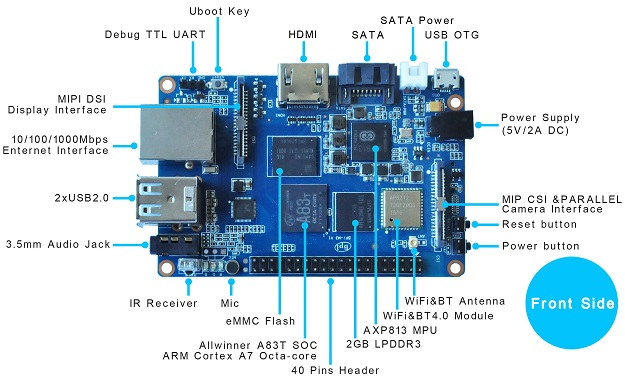
What I am using to run Linux:

Things to note:

  • Installer is made for 32-bit Linux which I'm using

  • Again, I'm using ARM

  • The file I'm trying to install is in /home/user/Downloads. Please let me know if there is a specific place I need to install from. That would be very helpful.

David Foerster
  • 35,754
  • 55
  • 92
  • 145
Anoraki
  • 25
  • 1
  • 6
  • R U speaking of Linux commands in /bin or a written script? Mount is a command to make file systems (drives)accessible. Are you trying to mount a drive? Typing 'man mount' in a terminal will give pertinent info on the command. More info as to what you wish to accomplish and what trouble you are actually having can give us a starting point to get you thru this dilemma. – Craig Aug 27 '17 at 02:26
  • I'm just trying to open executable files. It's an executable file. Not a .bin. The mount command shows where noexec is enabled and where it isn't. – Anoraki Aug 27 '17 at 02:46
  • Please run `cat /etc/fstab` and post it. Now when you do `mount` you will see all mounted files and from there you will see if any has the `noexec` attribute which will prevent running scripts on that mounted file. – George Udosen Aug 27 '17 at 05:46
  • Also run `mount | grep noexec` and post into your question – George Udosen Aug 27 '17 at 05:49
  • 2
    Are you trying to run a Windows executable file with the extension .exe? Executable files in linux are different and they are marked executable via the permissons, not via the extension. Some Windows exe files can be run via Wine (if you install the linux program package `wine`). – sudodus Aug 27 '17 at 06:35
  • proc /proc proc defaults 0 0 /dev/mmcblk0p2 / ext4 defaults,noatime 0 1 #/dev/mmcblk0p1 /boot/ vfat defaults 0 2 # a swapfile is not a swap partition, no line here # use dphys-swapfile swap[on|off] for that – Anoraki Aug 27 '17 at 16:19
  • 1
    And no, I'm not trying to run Windows executables. They do not have .exe at the end and are made to be ran on linux. – Anoraki Aug 27 '17 at 16:23
  • *I see. You have a real linux problem.* Please edit your original question and put the the content of the comment starting with `proc /proc ...` into it. Also, please render it as code by indenting each line with 4 spaces. It makes it easier to read. – sudodus Aug 27 '17 at 16:48
  • I may have missed this in your question, but what command are you using to try to run the executable? Also, are you getting an error? How do you know it's not working? – Arnon Aug 27 '17 at 18:15
  • 1
    1. ./program or just double-clicking. From what I've heard I should be able to right-click the file and have a 'run' button but I only have an open. When I select it nothing happens. 2. Not necessarily, but when I do ./program it gives an error about the format. Not just on one file but from every other executable I've tried. 3. Nothing happens, nothing opens. I've tried it on a few applications/installers that are for Linux that should have a window appear after starting. Such as Eclipse or PyCharm. – Anoraki Aug 27 '17 at 19:31
  • What are the ownership and permissions of `./program` (use a real example)? Please show the output of the following command, `ls -l ./program` and for example `ls -l /bin/echo` (with the standard program `echo`). – sudodus Aug 27 '17 at 20:38
  • ./program was an example. I've checked all of them. They all either have run as an executable forced on or enabled. They are meant to be ran on linux. I have two examples above. – Anoraki Aug 27 '17 at 21:03
  • Add the output of `file ./program; ldd ./program; uname -a` to the post, please. – muru Aug 28 '17 at 01:14
  • ./eclipse-inst: ELF 32-bit LSB executable, Intel 80386, version 1 (SYSV), dynamically linked, interpreter /lib/ld-linux.so.2, for GNU/Linux 2.6.32, BuildID[sha1]=fb6bb400367c454ee802b7d2af968089b1f684e0, not stripped not a dynamic executable Linux bpi-iot-ros-ai 3.4.39-BPI-M3-Kernel #1 SMP PREEMPT Thu Jul 13 09:32:18 UTC 2017 armv7l armv7l armv7l GNU/Linux – Anoraki Aug 28 '17 at 21:49
  • Almost a duplicate of [bash: ./program: cannot execute binary file: Exec format error](https://askubuntu.com/q/648555/301745) – wjandrea Aug 31 '17 at 01:14
  • How can I do so? I've tried the official PPA and it keeps saying 404 not found. Thanks for the information, though. I've just learned not to even bother trying to use ARM for anything other than mobile devices. – Anoraki Aug 31 '17 at 02:20
  • 1
    @DavidFoerster understood your problem perfectly well. When people usually say 32-bit installer, they mean installers for the x86 Intel architecture as opposed to the 64-bit x86-64/amd64 architecture. You can't run x86 software on ARM, whether or not it's 32-bit or 64-bit makes no difference. – muru Aug 31 '17 at 07:11
  • Please [edit] your question again and provide the relevant comments into the question where they're more visible. – Fabby Aug 31 '17 at 08:46

1 Answers1

3

You can't run Intel x86 executables on ARM CPUs because the latter don't understand the instruction set of the former (even though both have a word length of 32 bit).

However, you can install Eclipse from Ubuntu's software repositories which contains an armhf build of it:

  1. Enable the “universe” repository section (see How do I enable the “Universe” repository?), if you haven't already, and update the package list after the change:

    sudo apt update
    
  2. Install the package:

    sudo apt install eclipse
    

Unfortunately, the version of Eclipse in the repositories is pretty old (over 3 years) and building a recent version from source is non-trivial. I also doubt that you're going to have much fun with a resource-heavy interactive application like Eclipse on a low-resource system with an ARM A7 like yours. If you want to develop software for ARM systems you may want to look into cross-compilation which would allow you to develop software on your (x86-compatible) desktop computer which then runs on other platforms (ARM).

David Foerster
  • 35,754
  • 55
  • 92
  • 145
  • Thanks again for the info. I think I might just get an optiplex for almost the same price (86$) but with better specs and an intel processor, plus it's 64-bit. I already have a really nice computer on windows but I 'd want one that's more portable. My nice computer is about 25 pounds but an optiplex is 10 at most. Is there still compatibility with ubuntu software on intel core 2's? – Anoraki Aug 31 '17 at 10:49
  • @Anoraki: Could you please open a [new question](/questions/ask) if you have a new or follow-up question? The comment section is not suitable or meant for new questions or extended discussion. You’re welcome to send me a comment with a notification to draw my attention to it. Thanks. – David Foerster Aug 31 '17 at 12:48
  • @sudodus: Core 2 ≠ Core 2 Duo. Unity and Gnome Shell work well on my Core 2 Duo E8400 at least. – David Foerster Aug 31 '17 at 13:10