5

Firstly, I have installed VirtualBox throught the terminal. After that installed Genymotion. My OS is Ubuntu 16.04. But Genymotion tells that I need to install VirtualBox. What can be the reason for that?
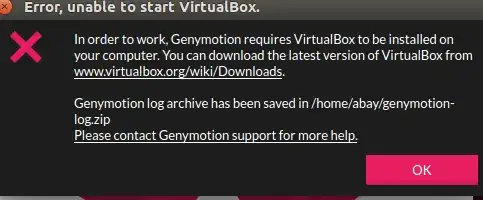
enter image description here

Takkat
  • 140,996
  • 54
  • 308
  • 426
neo
  • 151
  • 1
  • 3
  • It seems the same issue with a solution https://stackoverflow.com/a/40935696/1810128 – bistoco Aug 31 '17 at 17:26
  • What errors do you get when running `virtualbox` in a terminal? – Takkat Aug 31 '17 at 18:01
  • @bistoco It simply advices me to reinstall VirtualBox. It did not work for me – neo Aug 31 '17 at 18:59
  • What's the output for `whereis virtualbox` – bistoco Aug 31 '17 at 19:01
  • @Takkat I did not try to run virtualbox via terminal. It perfectly works, I checked it by finding it through the search and clicking on icon) – neo Aug 31 '17 at 19:01
  • @bistoco virtualbox: /usr/bin/virtualbox /usr/lib/virtualbox /usr/share/virtualbox /usr/share/man/man1/virtualbox.1.gz – neo Aug 31 '17 at 19:03
  • The output of `/etc/init.d/vboxdrv status` – bistoco Aug 31 '17 at 19:12
  • @bistoco what to write before `/etc/init.d/vboxdrv status` in order to execure command? – neo Aug 31 '17 at 19:35
  • that's the command to see if virtualbox modules are loaded in kernel. My ouput is `VirtualBox kernel modules (vboxdrv, vboxnetflt, vboxnetadp, vboxpci) are loaded.` – bistoco Aug 31 '17 at 19:37
  • @bistoco I put `/etc/init.d/vboxdrv status` on terminal,but it tells that there is no such directory or catalog. Check your command syntax pls – neo Aug 31 '17 at 19:39
  • Let us [continue this discussion in chat](http://chat.stackexchange.com/rooms/64906/discussion-between-bistoco-and-andy11). – bistoco Aug 31 '17 at 19:41

2 Answers2

1

I get this when I've used up all 128 of my host-only NAT adapters,

I've searched the web and there doesn't seem to be way to a) remove them all in a batch or b) make Genymotion use the same one instead of creating a new one every time it starts. (Although one page I read made it sound like that is supposed to be the case!)

The fix for me:

  1. Start VirtualBox
  2. Go to File -> Preferences -> Network and open the "Host-only Networks" tab
  3. One by one remove the vboxnet(0 to 127)'s!

Although you could just remove one and then start Genymotion - but you'd have to do it again next time! :)

Now if anyone knows how to stop Genymotion creating them ...

jackcorbae
  • 101
  • 3
0

If you downloaded/installed GenyMotion first then installed VirtualBox. Try rebooting your system, then relaunching GenyMotion. After doing this I was able to get the emulator up and working.