0

I need some help cleaning up a winsxs folder that is about 15GB in widows7. I went to this page, hoping that i could use the dsim command to reduce the size of winsxs. instead I get error 87, "remove option not recognized in this context" I went to MS technet, to look for support, but the support was something like, make sure you typed the command properly. I have typed the commands properly, and spacing is not the issue.

I have these disabled features, I would like to remove completely: How do I do it? enter image description here

j0h
  • 1,418
  • 5
  • 18
  • 27
  • Please provide the precise syntax you used. You have all available updates for Windows 7 installed. The article in question only applies to Windows 7 if the required update is installed. If you want our help, this information will help us, understand what is going on precisely with your system. *The lack of this information makes it unanswerable * – Ramhound Feb 11 '16 at 13:56
  • A 15 GiB WinSxS folder is quite normal. If you want Windows to use less space, you should upgrade to newer versions. – Daniel B Feb 13 '16 at 07:38
  • because windows is taking op 15+GB in Winsxs, I cant upgrade. I dont have room. – j0h Feb 13 '16 at 12:46
  • [No need to do an in-place upgrade. ;)](http://superuser.com/q/994096/219095) – Daniel B Feb 15 '16 at 20:26

1 Answers1

1

Features on Demand is a Windows 8 only feature (parameter is still there in Windows 10, but the feature only works for Server 2016). So the /Remove parameter in the command DISM.exe /Online /Disable-Feature /featurename:NAME /Remove is detect as unknown in Windows 7.

So update to Windows 8.1 to get this feature.

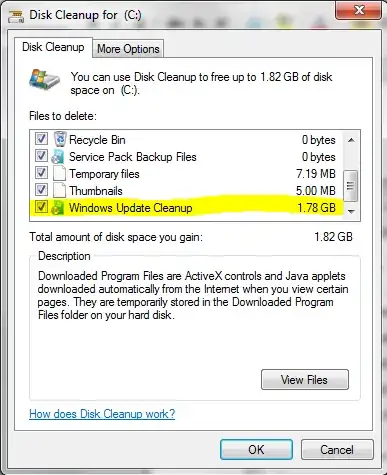
The only way to reduce the size of the WinSxS in Windows 7 is to install this update and run Disk Cleanup and select "Windows Update Cleanup":

enter image description here

enter image description here

After a reboot the old updates are removed and WinSxS will be cleaned up.

enter image description here

This can reduce the WinSxS a lot.

magicandre1981
  • 97,301
  • 30
  • 179
  • 245
  • I’m trying it, it didn't really say there would be substantial space saving. i'm kinda wondering if i delete the Winsxs folder entirely, if my PC will still function. Thanks for the explanation, I might have read something similar, but I think I got it when you explained it. Thanks for that. it turns out I also had old restore points that were still hanging around, despite having turned off system restore. – j0h Feb 13 '16 at 02:19
  • when I used this on family PCs it cleaned several GBs because of a lot of old IE updates – magicandre1981 Feb 13 '16 at 07:27