9

Is there a US international keyboard layout variant for Windows 10 that behaves like altgr-intl on Linux? That is, if I press ' it appears on-screen immediately (no deadkey), and if I want to type E I need to press Alt Gr+' followed by E.

I don't mind downloading it from a third-party.

kelvinelove
  • 147
  • 1
  • 13
Federico Poloni
  • 355
  • 1
  • 3
  • 14

3 Answers3

9

Here you can get what you want under United States International Alternate:

http://keyboards.jargon-file.org/

You can install it either through the executable or you can opt for the KLC source file(s) and install the layout with Microsoft Keyboard Layout Creator.

Shou
  • 153
  • 6
norok2
  • 286
  • 2
  • 9
  • Don't know why it got a downvote, but it seems exactly what I need. Thanks! – Federico Poloni Apr 14 '17 at 06:23
  • 2
    it's probably a -1 because it's just a list of keyboard installers that will trigger your corporate virus scanner, and it doesn't give any specifics on how to get the source file or install `us altgr-intl` on windows 10. – mendota Dec 12 '17 at 18:49
  • From user [Lu Tao](https://superuser.com/users/590814/lu-tao): For this method to work in Windows 10, just reboot after the setup.exe is done, the added keyboard will show in the list of available layouts under `Region & Language settings > Click on current keyboard > Options > Add a Keyboard` – fixer1234 Oct 24 '18 at 20:59
  • 1
    This method is still working perfectly on win 10 in november 2020. Thanks, nothing else worked for this problem. – user139299 Nov 23 '20 at 21:09
1

Another method is using an AHK script.
When you want to find out more about this method, please also take a look at the UltimateKEYS website and its GitHUB repository.

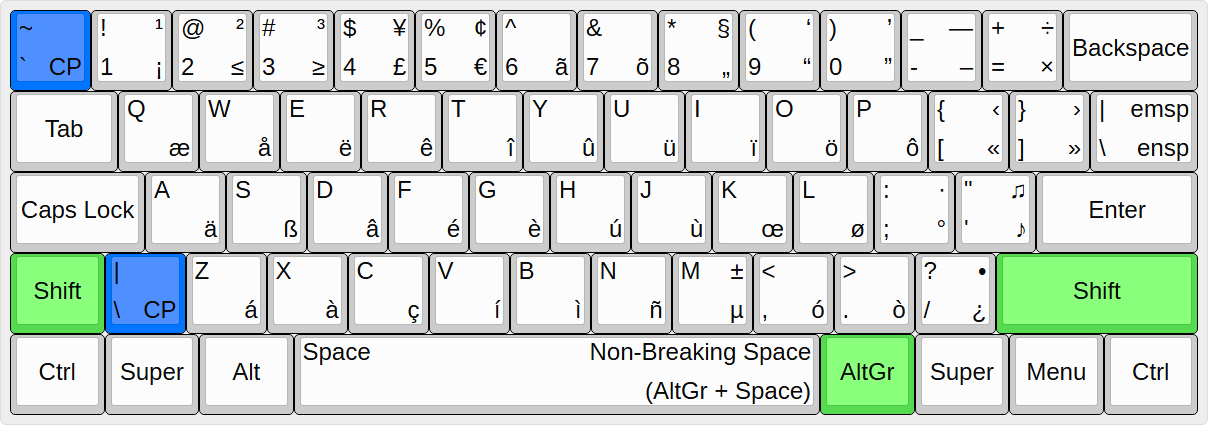
This is a project which I developed (based on EurKEY) and which attempts to harmonize languages with Latin-based alphabets on US QWERTY, having the dead key combinations, etc. on AltGr and AltGr+Shift.

This is the UltimateKEYS Keyboard Layout:

UltimateKEYS Keyboard Layout

Pieter_Degroote
  • 141
  • 1
  • 7
1

Alternatively to @norok2 you can create any keyboard layout using Microsoft Keyboard Layout Creator. Here's my step-by-step for Windows 10

  • Download and install
  • Open software and Load Existing Keyboard... from File menu. In my case I loaded US-International and saved it as US-International-AltGr (not rewriting original)
  • Right click over quote keys and remove Set as dead key flag
  • Check Shift States' Shift and uncheck dead keys again
  • Optinal: You can test under Project > Test Keyboard Layout
  • Once pleased, go to Project > Build DLL and Setup Page. It will check everything's alright and open created files
  • Click setup.exe and follow simple wizard
  • Important: Reset your PC. Found weird behavior in VSC before this

This was written with my new keyboard layout ;)

Alwin Kesler
  • 111
  • 3