25

How can I connect to a Samba share with authentication using Windows 7?

We have a bunch of Linux, HP-UX and AIX servers on our network with folders shared using Samba. These are not connected to our Active Directory or anything, we just type a user name and password when we connect to them. They still all work fine from Windows XP, but we've upgraded a couple of machines to Windows 7 and they can't access the shares. You get prompted for a password but it says "The specified network password is incorrect" (it's not).

Colin Pickard
  • 8,579
  • 3
  • 31
  • 38
  • See also http://serverfault.com/questions/91797/windows7-the-specified-network-password-is-not-correct-when-the-password-is – Mike T Jul 26 '12 at 00:11

4 Answers4

24
  1. Run: gpedit.msc

  2. Find:

    Console Root -> Local Computer Policy -> Computer Configuration -> Windows Settings -> -> Security Settings -> Local Policies ->Security Options

    When you're there change the following policies

  3. Microsoft network client: Send unencrypted password to third-party SMB server: Switch it to "Enabled".

  4. Network security: LAN Manager authentication level: Select the option: Send LM & NTLM - use NTLMv2 session security if negotiated.

Kevin Panko
  • 7,346
  • 22
  • 44
  • 53
Cy.
  • 358
  • 4
  • 14
  • Thanks, this solves the problem. It sounds like we should probably be upgrading samba on all our servers too, but that will take a while... – Colin Pickard Mar 03 '10 at 09:56
  • 1
    doesn't work for me >:( – endolith Jun 10 '11 at 04:22
  • 6
    @ Cy. Instead of running gpedit.msc and doing all that navigation, secpol.msc takes you directly to your security settings. Everything else is correct otherwise.. –  Jun 16 '12 at 20:17
  • Unless you're running an old version of Samba none of this should be necessary. You're best off upgrading Samba. –  May 17 '13 at 13:11
  • 1
    @user168261: I'm running latest version of Samba. #4 works (and is needed). #3 is unnecessary (with later Samba versions). – Gerrat Jul 11 '13 at 21:05
  • 2
    I am running Windows 8 and this solution did not work for me. – ktamlyn Jul 25 '13 at 20:35
  • On Windows 7 x64 Enterprise - A reboot was not needed.- Samba Version 3.0.33-3.40.el5_10 – Jason Pyeron Dec 04 '15 at 09:45
  • I don't have gpedit.msc – CashCow Aug 07 '16 at 15:58
  • `Windows + R > secpol.msc` is the choice to edit policies... in Windows 7 Ultimate, if you try to add an Snap-in via `mmc` in order to administrate local policies, it does not allow you to change policies, even though you are an Administrator. –  Jun 06 '17 at 20:33
6

I had the same problem. This did the job for me:

Get Vista and Samba to work | TechRepublic

  1. Open the Run command and type "secpol.msc".

  2. Press "continue" when prompted by Vista.

  3. Click on "Local Policies" --> "Security Options"

  4. Navigate to the policy "Network Security: LAN Manager authentication level" and open it.

  5. By default Windows Vista sets the policy to "NTVLM2 responses only". Change this to "LM and NTLM – use NTLMV2 session security if negotiated".

slhck
  • 223,558
  • 70
  • 607
  • 592
0fnt
  • 1,931
  • 7
  • 24
  • 38
3

If you're running an old version of Samba, it's possible that you're run into this problem. Here is some further discussion. Basically, Windows Vista and 7 disable an old and insecure method of authentication which Samba was using by default. Tweaking the registry setting as described in the article should get it working. Ideally, of course, you would upgrade Samba to a new version, but that might not be possible at the moment.

If this doesn't work, could you post the version of Samba that you're running?

dsolimano
  • 2,906
  • 2
  • 23
  • 37
  • I did not have a LmCompatibilityLevel key on my Win7 machine. I don't know if creating the key would have worked? The gpedit solution worked for me anyway. – Colin Pickard Mar 03 '10 at 10:02
  • 1
    What version of Samba is required? Is it a samba configuration issue? – endolith Jun 10 '11 at 04:00
0

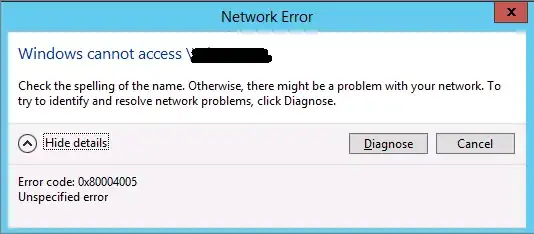
I had same issue. When I try to connect I get 0x80004005 permission error:

enter image description here

While I do:

  • Change Network security: LAN Manager Authentication Level to “Send LM & NTLM responses”
  • Change Minimum Session Security for NTLM SSP to disable “Require 128-bit encryption” into “No Minimum Security”.
  • Uninistalling KB2536276.

another thing stop from done is:

  • activate Client for Microsoft Networks in my WiFi dangle Network panel.

Enabling File and printer sharing for Microsoft Networks in Network panel allow me access to Win7 shared folders.

gavenkoa
  • 1,906
  • 5
  • 31
  • 38