0

I have an HP Folio13 laptop which includes a Synaptics TouchPad. I'm running Windows 7 Home.

I want to permanently disable the TouchPad since it doesn't function properly so I use a mouse or keyboard nav instead, but I'm constantly hitting the TouchPad with my wrist.

  • In Mouse Settings:

    • ClickPad Disable indeed disables it, but only until I reboot.
    • Disable internal pointing device when mouse is plugged in doesn't help me when the mouse is not plugged in.
  • In Device Manager:

    • the context menu doesn't have a Disable option like other devices.
    • If I Uninstall the driver, it auto-reinstall soon after.
  • I saw this answer but the fixes are specific to Dell so,

    • I don't see an option in BIOS, and,
    • I don't have the option to disable in the Mobility Centre.

Surely I'm missing an option somewhere, to avoid having to open up the laptop and physically disconnect it?

Thanks!

img

ashleedawg
  • 586
  • 1
  • 7
  • 21
  • Open up the laptop. Inside you will have a molex that connects the touchpad to the keyboard. Disconnect it. Tape the end of the molex to protect against shorts. Close the laptop. – SilvaR Nov 05 '18 at 13:57
  • Thanks - although I was trying to avoid having to open it... One would think there'd be a software method, or at least prevent drivers from auto-reinstalling for a specific device. (Hmm, I wonder if it would be bad for me to intentionally corrupt the DLL...) – ashleedawg Nov 05 '18 at 14:52
  • aren't tongue in cheek comments the best? :P your approach is solid but you forgot a critical step. you need to remove the drivers from your drive store. – SilvaR Nov 05 '18 at 15:05
  • @RicardoS. -that wasn't actually intended as tongue-in-cheek, so I tried it, and my problem appears to be **[solved](https://superuser.com/a/1372893/774713)!** :-) – ashleedawg Nov 05 '18 at 15:28

1 Answers1

1

...after I thought about it more, I simply backed up the driver specific to the TouchPad (C:\Windows\System32\drivers\SynTP.sys) and then replaced it with a random file (I just renamed a jpg.)

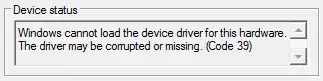
After rebooting, the TouchPad is completely disabled, and there doesn't appear to be any other ill-effects, plus I didn't even get an error - except, of course, when I check the Status of the driver:

img

...ahhh, that's better!

ashleedawg
  • 586
  • 1
  • 7
  • 21
  • That's creative :) I'm afraid that Windows Update may break it, though. – gronostaj Nov 05 '18 at 15:45
  • Windows Update has run without a problem... maybe since this driver is from the laptop's OEM rather than Microsoft...? – ashleedawg Nov 08 '18 at 01:08
  • It will run fine, but at some point Synaptics may release a new driver and WU will try to install it, replacing your broken driver with a real one. I don't know about Synaptics, but ELAN touchpads get WU updates a few times per year. – gronostaj Nov 08 '18 at 07:07