13

In the same vein as this question, how do you determine what speed the USB ports are on your machine with different OSes installed?

  • Windows XP
  • Windows Vista
  • Windows 7
  • Mac OS X
  • Linux (Ubuntu)
  • etc.
dwj
  • 1,444
  • 5
  • 21
  • 26

4 Answers4

5

The way I check for Windows is Start → Run → devmgmt.msc → Universal Serial Bus controllers -> (expand).

  • If there's one that says "Enhanced Host Controller" then it has 2.0.
  • If they're all "Universal Host Controller" assume 1.1.

At least that's how it looks in Windows Vista, Server 2008 and XP for me. Windows 2000 Pro says something like USB 2.0 root.

slhck
  • 223,558
  • 70
  • 607
  • 592
hyperslug
  • 13,668
  • 4
  • 49
  • 62
  • 4
    An easier way on Windows XP and above if you have a mixture of USB 1.1 and 2.0 ports is to just plug in a USB 2.0 compliant device. If the port is USB 1.1, Windows will notify you that moving to a faster port will improve performance. If you don't receive a notification, its safe to assume the port is USB 2.0 compliant. – Kenneth Cochran Jul 28 '09 at 13:25
  • Interesting that my current computer shows a mixture: http://img32.imageshack.us/i/usblistcapture728200962.png/ I'll have to use Kenneth's suggestion to see which is which. – dwj Jul 28 '09 at 13:37
  • I have heard somewhere that there can be both 1.1 and 2.0 controllers in a single chip, selecting the right one automatically. Dunno if that makes any sense though. – u1686_grawity Jan 19 '10 at 15:57
  • @Kenneth, that just turns the question into "how do I know if [some device] is USB 2.0-compliant?" Good tip though. – Pops Jul 11 '10 at 22:42
  • This tip does not work very well in Windows 7; I know my board has 10 USB 2.0 ports and 2 USB 3.0 ports, and they are labelled 5*Standard OpenHCD USB Host Controller and 2*Standard Enhanced PCI to USB Host Controller. – Zds Aug 16 '11 at 16:33
  • 6
    BTW, on Device Manager, the "View" / "Devices by Connection" is immensely more useful for tracking like this than the "Devices by Type", because then you can see the connection path for every device. Like, "Keyboard connects to USB hub X, which connects to hub Y". – Zds Aug 16 '11 at 16:50
5

On Linux

  • USB 2.0 will use the ehci_hcd module
  • USB 1.x will use either ohci_hcd or uhci_hcd modules.

You can find out which module is being used by lspci -v or lshw.

Perhaps a better method (if you're interested in particular ports/devices) is to use "lsusb -t"

Mike McQuaid
  • 4,029
  • 1
  • 24
  • 17
2

On OSX, you can go launch System Profiler and look for USB. If you have a High-Speed bus, that means USB 2.0.
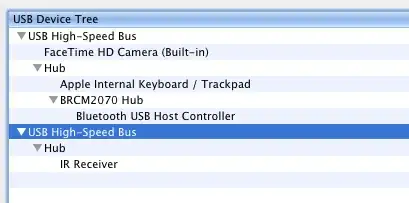
enter image description here

Also, the speed is shown, here it's 480 Mb/sec, indicating USB 2.0

enter image description here

Also this may help:

$ ioreg -k IOUserClientClass | grep UserClientClass | grep USBDeviceUserClient | head -1 | sed -e 's/.* = //'
"IOUSBDeviceUserClientV2"
slhck
  • 223,558
  • 70
  • 607
  • 592
Jorge Bernal
  • 431
  • 2
  • 3
0

On Mac OS X it depends on the hardware, not the software. If you are running a fairly modern Mac, then you have USB 2.0. All Intel Macs and the last couple of generations of PowerPC machines have USB 2.0. I had a first generation aluminum PowerBook 17" that I bought 5.5 years ago. That machine had USB 2.0, so unless you get a really old machine it will probably have USB 2.0.

Mark Thalman
  • 978
  • 10
  • 15