I am looking for an fast online/offline free solution to change the page order of a PDF file, such as changing the 5th page of a PDF with 3rd.
Asked
Active
Viewed 5.8k times


7 Answers
10
If you use or have access to a Mac:
- Open the pdf with Preview.
- Select View -> Contact Sheet or View -> Thumbnails
- Drag the pages into the order you want them in.
- Save the file.

JRobert
- 6,744
- 24
- 28
6
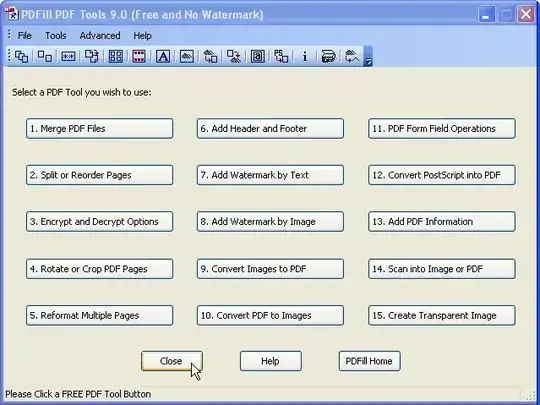
You can use the free PDFill PDF Tools


-
link does not work well...need to change .HTML to .html ... – NT. Sep 17 '11 at 07:52
-
@NT: Edited as you requested, although AFAIK it shouldn't matter. – harrymc Sep 17 '11 at 09:08
-
No freeware. Watermark will be added. – BenCes Jan 21 '15 at 09:38
-
@BenCes: The linked page says: "No watermarks! No pop-up ads! FREE for personal or commercial use! FREE distribution!". – harrymc Jan 21 '15 at 10:19
-
Test it by yourself and check the watermarks. – BenCes Jan 22 '15 at 11:32
6
Easiest way? Print the original PDF, choosing either Cute PDF Writer or Adobe PDF from the print dialogue screen. Under "Print Range", simply type all of the pages in the order you want them printed (eg. "1,2,5,4,3,6,7,8). The file will prompt you to save to a location. The saved PDF will be with pages in the new order.

Larry Camp
- 61
- 1
- 1
-
Can you add links to the software you specified and give a description of the software in question? – bwDraco Oct 11 '12 at 15:09
-
-
You can do this with any pdfprinter e.g. doPdf, thanks Larry, very clever solution! – Peter Apr 17 '15 at 06:08
-
I used Adobe Reader to print to "Microsoft Print to PDF" with a different page order, and it worked, but the resulting file is 40% larger. That doesn't really make sense. – pacoverflow Mar 21 '20 at 08:59
4
pdftk can be used to perform various operations on a PDF file.

Ignacio Vazquez-Abrams
- 111,361
- 10
- 201
- 247
2
For changing the page ordering, there's a very simple online tool called PDFHammer that should do the trick.
If you happen to be on a Mac, Preview can be used for more advanced editing of PDFs, including annotating pages, adding extra images as well as rearranging and deleting pages.

Damien Ayers
- 365
- 2
- 6
-
The online tool has been removed. Should we down-vote answers that were once correct, but no longer. – fgregg Sep 06 '11 at 21:15
-
1
PDFSAM (PDF Split and Merge) is a free open-source tool that can split PDF documents out to individual pages and then remerge them in whatever order you like. I've used it previously and it works great. I think it requires the Java runtime which is installed on practically every machine these days so generally it "just works".

Mokubai
- 89,133
- 25
- 207
- 233
-
2"Java runtime which is installed on practically every machine these days" - not true at all! – Shevek May 27 '10 at 10:59
-
Okay, To clarify: I wouldn't touch Java with a barge pole even if you paid me (well, maybe if you paid me a lot) but there are still a lot of websites and some programs that require Java, and while I admit it also isn't installed by default it is incredibly easy to visit J. Random Website and a few clicks later have Java installed. I would expect quite a few Linux distros to have it by default (to make life easier) and from what I've read MacOS X comes with Apple(C) Java preinstalled too. You want me to change it to read "is *available* on practically every machine"? – Mokubai May 27 '10 at 11:16
0
If you need to re-order the pages of a PDF document on Windows then take a look at Infix PDF Editor from Iceni...
To re-order pages using Infix, simply open your document and then from the menu select 'Document > Pages > Re-order...'
A user-friendly dialog will pop up enabling you to specify a range of pages to move and a target destination. No messing around with command line stuff!
The free version of Infix will apply a small watermark to the footer of saved documents however you'll find this can be removed fairly easily, and there's no trial period expiry.

studiohack
- 13,468
- 19
- 88
- 118

AffineMesh
- 672
- 3
- 6