5

This might sound ridiculous, but my eyes are tired of looking at the crappy font rendering in OS X's Terminal.app, is there anything you guys recommend?

I know it's like one of those things that you can easily say, "It's shell! what more can you ask for!" but really, all these great methods for rendering fonts and anti-aliasing, and we developers haven't even integrated that into our most trusty tool... at least that I know of.

Anyhow, let's discuss shell alternatives, thoughts?


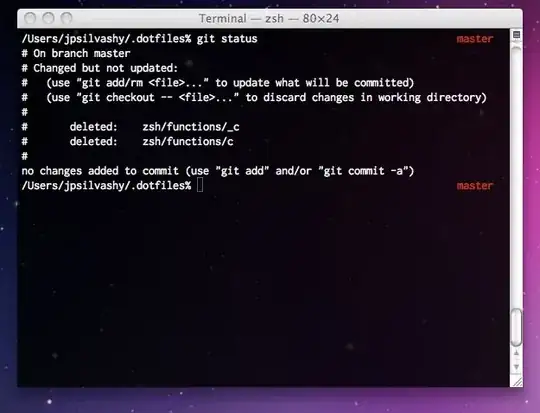
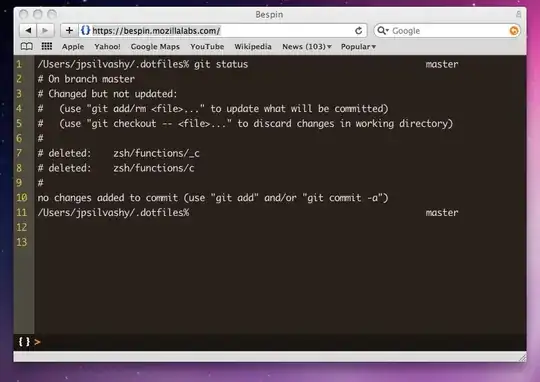
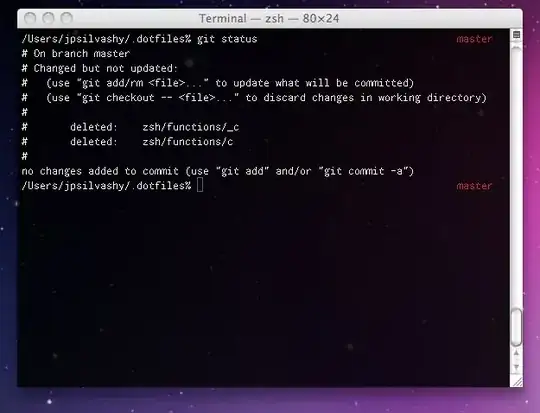
No antialiasing, antialiasing on and how Safari renders text:
enter image description here

enter image description here

enter image description here

Granted I know the type is a little larger in the Safari than the other examples, but you can see the differences, and while they are minute it's this type of tiny detail that makes looking at the same thing for 8 hours a day significantly better.

Gaff
  • 18,569
  • 15
  • 57
  • 68
JP Silvashy
  • 325
  • 1
  • 2
  • 10
  • Crappy font rendering? I don't get it. What do you mean specifically? I can set the text to be Antialiased in the preferences, and the default font and size, and it looks as good as any other application… Maybe try a different font? – ghoppe May 27 '10 at 21:59
  • Well here's the deal, I actually like the small 12px un-antialiased look, however my monitor's resolution is high enough that I need to scale the font up. The antialiasing it does employ is pretty crappy, and blurry at best, regardless of fonts. It doesn't take advantage of more advanced font sharpening technology like chromatic aberration, like your browser is doing at this very moment. – JP Silvashy May 27 '10 at 22:11
  • I wonder how does your terminal look like. I have change the background for a transparent one and works for me. Is not spectacular, but I don't want to be disturbed either: http://img237.imageshack.us/img237/4301/capturadepantalla201005j.png – OscarRyz May 27 '10 at 22:11
  • Interesting. Do you have a link which discusses the poor font rendering in Terminal.app vs in Firefox? I assumed they would use the same antialiasing technologies. – Stefan Lasiewski May 27 '10 at 22:14
  • I've added screenshots to show a few things, note how Bespin (web based editor) in Safari has subtle text drop-shadows that make the font a little sharper, and more refined, as well as just generally better rendering. – JP Silvashy May 27 '10 at 22:26
  • I remain skeptical that font rendering is different. I've made a screenshot of a Terminal window overlapping the browser using the exact same font and colors. Methinks the problem lies in your choice of font/colors. http://skitch.com/ghoppe/dfuqj/screen-shot-2010-05-27-at-4.28.10-pm – ghoppe May 27 '10 at 22:39
  • Proof: http://skitch.com/ghoppe/dfute/screen-shot-2010-05-27-at-4.49.17-pm Whatever fuzziness you see is a result of jpeg compression. I assure you, they look quite similar on my screen. – ghoppe May 27 '10 at 22:53
  • Perhaps you are right, what font are you using? – JP Silvashy May 28 '10 at 17:26
  • That last screenshot was taken with good ol' reliable Monaco to match your bespin site. I prefer Apple's new monospace font Menlo (comes with Snow Leopard), though. – ghoppe May 28 '10 at 22:07
  • Side note: One thing people may not be aware of is that the highest quality, sub-pixel antialiasing only works on external displays if the display is known to the OS to support it. So sometimes people report worse antialiasing on those external displays and other people can't reproduce the problem because they have a display that supports sub-pixel antialiasing. However, screenshots should capture exactly what was rendered on that display. – Chris Page Aug 21 '11 at 12:13
  • From what I can tell from the two screenshots with antialiasing, they are using two different fonts. In addition, they have different color schemes, which will cause subtle variations in antialiasing. Since the currently accepted answer is to use Visor, which merely controls the Terminal application, chances are the _real_ answer is that they happen to like the appearance that Visor chooses by default. In which case the real answer to this question is: Customize the font and color settings in **Terminal > Preferences > Settings** to something you like better. – Chris Page Aug 21 '11 at 12:18
  • Also note that Terminal uses the same font rendering facility provided by the OS as every other program. So it should produce the same results as any other application on the same machine, given the same font settings and color scheme. (Of course, Terminal also has the option to turn off antialiasing where other programs don't, but this is about when antialiasing is enabled, right?) – Chris Page Aug 21 '11 at 12:23

3 Answers3

5

I really like visor:

http://visor.binaryage.com/

"Visor is a system wide terminal accessible via hotkey"

It looks cool, is very useful, and is customizable ad nauseam.

D Lawson
  • 111
  • 2
  • looks cool, taking a peek now. – JP Silvashy May 27 '10 at 21:50
  • Could you guy paste images and/or videos of Visor? I saw a demo long time ago, but I have "always" deferred from installing it, because it is not the classic "Drag into Apps folder" mechanism. – OscarRyz May 27 '10 at 22:04
  • http://www.youtube.com/watch?v=fvbE9UX_0GY http://www.youtube.com/watch?v=amtczuKzcpI&feature=related http://www.youtube.com/watch?v=Y5JItw_vtoY&feature=related - this guy has it at only half width, which is not my favorite. It's really not bad to install these days – D Lawson May 27 '10 at 22:06
  • Watching... Nahh, is not that bad to install, but, this is Mac, I mean, I should download the .dmg double click, drag&drop to the Apps folder ( which btw should be a link right there ) I can do any number of sudo apt-get install whatever in linux anytime :P But in OSX feels like I'm doing too much. ;) ( +1 btw ) – OscarRyz May 27 '10 at 22:16
  • I agree, it's more complicated than a typical Mac install, but this is also superuser... Thanks for the +1! – D Lawson May 27 '10 at 22:21
  • 2
    Doesn't this just wrap Terminal.app? It'll have the exact same font rendering etc.. – dbr May 27 '10 at 23:07
  • @dbr: Yes. Visor is just an extension that creates a Terminal window that slides onto the display when you type a hot key. I don't see how this is an answer to the original question. – Chris Page Aug 21 '11 at 12:08
  • A note for posterity: visor (or 'totalterminal') are not natively compatible with OSX >= 10.11 (el capitan, sierra, etc) because of ['System Integrity Protection' (SIP)](http://osxdaily.com/2015/10/05/disable-rootless-system-integrity-protection-mac-os-x/) – DilithiumMatrix Nov 21 '16 at 15:51
1

I use iTerm, I don't have a problem with the fonts, but it is an alternative.

Mitch Dempsey
  • 1,166
  • 1
  • 10
  • 16
1

iTerm2 has a pending feature request to provide a more Windows-looking style of anti-aliasing since a lot of people don't like how OS X does it. Star this issue to get updates when it changes: http://code.google.com/p/iterm2/issues/detail?id=312

George
  • 2,007
  • 22
  • 9