4

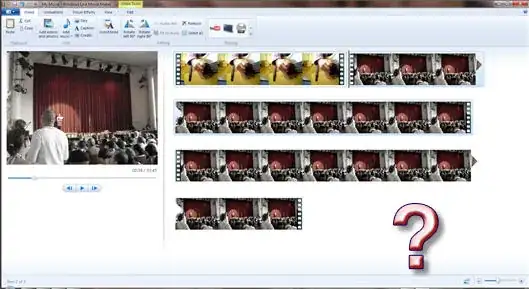
I have Windows 7 and wanted to make a quick movie with Movie Maker but apparently in the new version of MovieMaker they changed the interface to the Office 2007 Ribbon and now I can't find the functionality I used to use:

All I want to do is:

  • cut the two videos so I get the pieces I want
  • drag those pieces down into the time line
  • drag one video over the other so that it fades into it

But the "cutter" icon is gone and the timeline at the bottom is gone. And under animations there seems to be new animations but I don't find fade.

How can I get the cutter icon, the timeline, and the fade animation to appear again or what's the new paradigm I don't understand?
alt text

Gaff
  • 18,569
  • 15
  • 57
  • 68
Edward Tanguay
  • 13,695
  • 37
  • 102
  • 128

1 Answers1

2

Select the clip you want to cut. Under the 'video tools' that appears is a 'trim tool' that allows you to select the part you want. Don't forget to 'save trim'.

The fade is hiding in the 'animations' tab under 'transitions' and is called 'cross fade'. Select the clip you want to fade into, go to the animations tab and expand the transitions list. cross fade is fairly close to the top.

good luck

  • thanks, that's getting me there, I don't understand when I am "on the fade" so I can, e.g. delete it and add a new one or define it's duration. Is there a way as in the old version to drag a video onto the other one so that you can control visually when the fade starts and stops? – Edward Tanguay Jul 04 '10 at 12:12
  • so now I have two videos, when it I click on one, it shows it has a pixelate animation of 2 seconds, and when I click on the second video it shows it has a crossfade animation of 1 second, but when I play the videos, there is no fade :-( – Edward Tanguay Jul 04 '10 at 12:15
  • I don't know about the dragging but I can't find it either :-( But the transitions just work for me so I'm afraid I can't help you any further there :-( –  Jul 04 '10 at 12:45
  • I had to add a black .png at the end and crossfade into it to get it to fade out, ok, slowly getting it, thanks. – Edward Tanguay Jul 05 '10 at 03:28