On all Windows machines there seem to be a number of svchost.exe processes running. What do this processes do and why are so many running?
Asked
Active
Viewed 2,073 times
34

-
3+1 Funny so few people bother to upvote a good question ;-) – Ivo Flipse Aug 01 '09 at 19:28
-
There is a duplicate at ServerFault: http://serverfault.com/questions/11402 – Peter Mortensen Aug 09 '09 at 20:40
2 Answers
33
I've written a lengthy explanation of what this process is, and how to figure out what each one of them does.
The bottom line is that svchost is a process that contains all of the Windows services. Since there are many Windows services, there are also many instances running.
What is svchost.exe And Why Is It Running?
The easiest way to check on these is to use Process Explorer:
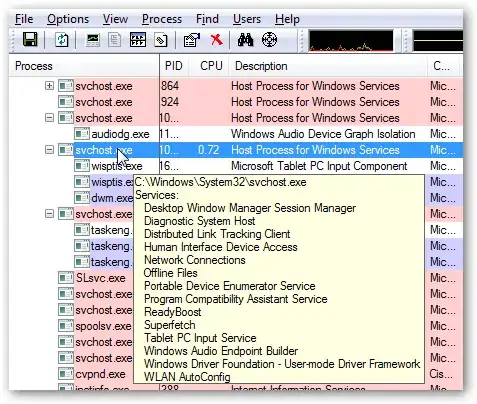

Gaff
- 18,569
- 15
- 57
- 68

The How-To Geek
- 6,042
- 8
- 44
- 47
-
7Why...you...little... You beat me by 20 seconds, and used the exact same link! – Dan Walker Aug 01 '09 at 17:37
-
3
11
svchost is the process which runs all the services on your computer. Each service that runs gets its own copy of svchost, which is why there are so many copies running.
The How To Geek has some more detailed information.

Dan Walker
- 9,287
- 38
- 50
-
2Many instances of svchost contain more than just one service, so not every service gets its own host. Also there are still services that live in their own, individual, non-svchost process. – Joey Aug 01 '09 at 18:31
-
@Johannes Rössel: there is a way to let each service have each own svchost: http://serverfault.com/questions/2786/finegrain-performance-reporting-on-svchost-exe/17636#17636 – Peter Mortensen Aug 09 '09 at 20:45