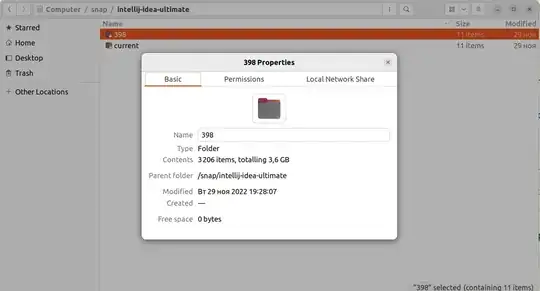
When I opened nautilus, it showed that I have 3 Gb of disk space available. Then I installed a snap package. According to the properties of this snap directory, it takes up 3.6 Gb of space. However, it's now shown in nautilus that I have 1.8 Gb available which is a lot more that expected. How can this happen?
Another weird behavior is when I see the properties of a /snap/ directory, it shows it takes 224 bytes. But when I go into this directory and see the properties of a particular version, it takes up 3.6 Gb. Can somebody explain me what's happening? How is disk space handled by snap? Does it use shortcuts to files placed in other disks partitions? Does it somehow compress the files?
What I've done: I viewed the disk space which was 3 Gb. Then I installed a snap package which weights 3.6 Gb. It should've not been installed as there was not enough space. However, it did install and the disk space got 1.8 Gb.
where I watch the disk space

package directory size
package version directory size