1

When I double click a file in finder to open in Komodo edit, it displays an error message saying it can't find the file and the path is displayed, but with wrong encoding, such that special characters such as "ó" and "ð" are displayed as some weird boxes.
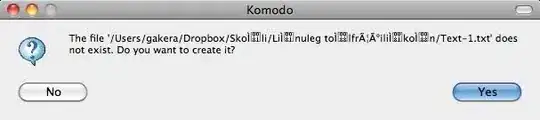
enter image description here

I'm running OS X Snow Leopard 10.6.4 and Komodo Edit version 5: "Komodo Edit, version 5.2.4, build 4343, platform macosx-x86. Built on Tue Dec 8 18:18:35 2009."

When I drag the file into Komodo edit it opens just fine displaying the path correctly with "ó"s and all :P This doesn't happen if I right click the file in finder and select to open it with TextEdit or Word or (God forbid) MacVim - only when I select to open it in Komodo edit.

This is annoying as all hell.

Gaff
  • 18,569
  • 15
  • 57
  • 68
gakera
  • 425
  • 2
  • 6
  • 11

1 Answers1

0

I repro'ed this with 10.5 with Komodo Edit version 5.2

I'll log a bug at http://bugs.activestate.com/enter_bug.cgi?product=Komodo -- please watch there for followups.

  • Eric
Eric
  • 471
  • 1
  • 7
  • 19
  • So this is a bug, and not just me being a noob? I feel so ... validated. – gakera Sep 03 '10 at 08:22
  • The bug is at http://bugs.activestate.com/show_bug.cgi?id=87859 -- the URL in the previous comment is useless, unless you want to enter a new bug. I'm told this bug was fixed for version 6 (nightly builds and betas available at http://downloads.activestate.com/Komodo I couldn't duplicate the problem, and I can't figure out which code was fixed off hand, but I'm closing that bug. – Eric Sep 04 '10 at 00:47
  • my directories were named "Skóli" and something else like "lík og tölfræði", So I hit the trifecta of special characters, spaces and ... the third thing that's not allowed to use in filenames or something. Maybe that will help you recreate it if you want to. I'll check out the version 6, thanks. – gakera Sep 05 '10 at 18:55