8

I use keyboard shortcuts rather heavily. I have a dual monitor setup. I also have virtuawin so I can switch between desktops.

The result of all this is that sometimes I will start using keyboard shortcuts in the wrong window. This can have disastrous effects. For example, what if I think I'm in firefox and use Ctrl-L to go to the location bar, but instead I end up deleting a line in Visual Studio 2008 (without noticing it?!). This could be very, very bad.

Is there a way that I can make it blindingly obvious which window is active? For example, could I find some tool which will gray out any inactive windows?

I would be willing to use autohotkey or a variety of other advanced tools to set up a solution.

Thanks.

K Robinson
  • 1,029
  • 2
  • 16
  • 26
  • this problem has gotten so much worse in Windows 7. Wish I knew a simple trick to bring Win7 at least up to the WinXP level of picking out the active window. right now I have to activate and unactivate a window while looking at the title bar and toolbar button down below to figure it out. – jacobsee Oct 04 '12 at 19:33

4 Answers4

4

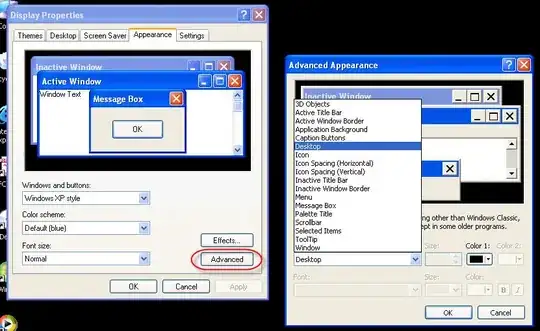
Are you looking for more granularity than this?

alt text

BillP3rd
  • 6,393
  • 2
  • 30
  • 39
  • 2
    Problem with that is that it forces you to use the super ugly Windows Classic skin... – digitxp Sep 10 '10 at 14:57
  • I would prefer a way to dim an entire window when it's inactive, but this helps. +1 – K Robinson Sep 10 '10 at 19:10
  • Any ideas on how to make this work for office 2007? – K Robinson Sep 10 '10 at 19:54
  • There's good news and bad news. The good is that you *can* change the Word color scheme. It's described at http://office.microsoft.com/en-us/word-help/change-the-appearance-of-office-programs-HA010174912.aspx. The bad news if that your choices are pretty limited. You'll find more information at http://www.technologyquestions.com/technology/microsoft-office/225123-office-color-schemes.html. – BillP3rd Sep 10 '10 at 20:30
3

For Windows 10

I found this question while googling for this same issue on windows 10 and wanted to log my answer for others like me (even though this question was originally about winxp) :

open "Settings" app
-> "Personalization" tile
-> sidebar: "Colors"
-> scroll to "More options"
-> "Show accent color on the following surfaces"
-> check the box next to "Title bars"

Now the focused window will have a coloured title bar, and the other windows will have a white title bar.

Beware: this doesn't work on programs that don't use the windows color settings (spotify comes to mind) but as long as they're the exception and not the rule that shouldn't be an issue.

mic84
  • 2,363
  • 2
  • 21
  • 17
Joran Dox
  • 133
  • 5
  • Great, except all the applications that don't use standard windows. On FireFox I see an outline, slack has no change, Chrome always changes the titlebar color. But it's better than nothing. – Rob Mosher Jan 04 '23 at 18:59
  • @RobMosher Yes, that's what the "Beware" section at the bottom of my answer is about – Joran Dox Jan 05 '23 at 14:17
  • Microsoft is pushing Windows 11 in 2023, but still hasn't done anything to clearly highlight focused windows by default in Windows 10. Considering the obviously disastrous effects that this often has, how it even possible? – user2153235 Jul 25 '23 at 16:11
2

Check out this AutoHotKey script.

digitxp
  • 14,432
  • 9
  • 56
  • 76
  • 1
    A little buggy (even the "improved" version linked at the bottom) but a great idea regardless, especially for those who's eyes strain easily. – John T Sep 10 '10 at 01:12
  • Linux (Compiz) has a plugin called ADD Helper that does the same thing. – digitxp Sep 10 '10 at 14:56
  • @JohnT: your note led me to find the ghoster.ahk thread; I found a 2008 version here which works OK: http://www.autohotkey.com/forum/post-188098.html#188098 but it has some bugs when dealing with some modal dialogs and it also breaks keepass's Ctrl-V capability. – K Robinson Sep 10 '10 at 19:27
-1

Simple AHK solution, make the window blink:

SetTitleMatchMode,Fast
^x::
WinGetActiveTitle, Title
WinGetPos, X, Y, Width, Height, %Title%
Loop, 3
{
   WinHide,%Title%
   WinShow,%Title%
}
return
John T
  • 163,373
  • 27
  • 341
  • 348
  • That looks like a great idea. Can autohotkey automatically detect when a new window gains focus? I need something that doesn't involve an active action to find out what's active (if I remembered to use a hotkey, I would just remember to glance at the title bar more carefully all the time). – K Robinson Sep 10 '10 at 18:51