I would like to amplify my voice using the computer. My Windows won't play the audio from the mic by default. How to configure it to do so? Should I use some app? Which one?
Asked
Active
Viewed 2.9k times
8
-
1related question, but for windows xp: http://superuser.com/questions/95384/how-can-i-redirect-sound-coming-in-from-the-mic-to-the-speakers-output – Jader Dias Nov 05 '10 at 01:27
2 Answers
14
In Windows 7 is slightly different from Windows XP
I had to check the "Listen to this device" box in the Microphone properties
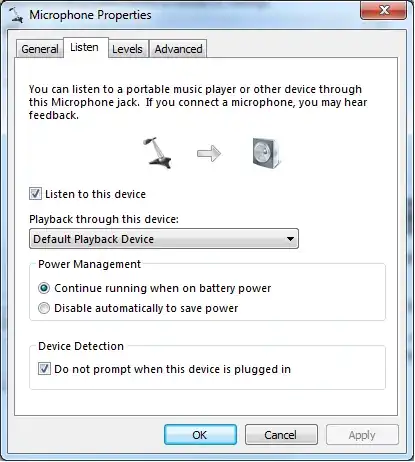

Jader Dias
- 15,756
- 60
- 143
- 196
-
have you tried setting the level to 100 in the levels tab? Also in the advanced tab, select the highest studio quality option. – Owen Nov 05 '10 at 05:34
-
-
I dont suggest using "Listen to this device" (I don't know why but gives delay). Id suggest going to Devices > Speakers > Levels > and there turn on the microphone (this way there arent delay problems) – sports Feb 27 '15 at 00:31
0
I am not sure with translation (I don't have english windows) but i tried
open control panel - sounds - first tab (play), double click speakers and on second tab enable microphone.

Tomas
- 306
- 2
- 7