3

Possible Duplicate:
Permanently deleting files on Mac OS

What's the Mac keyboard shortcut to rm a file? I know command + delete sends it to trash, but I want to permanently delete it, say with command + fn + delete.

UPDATE: It doesn't look like there is one. So, I want to create a service with Automator and then assign a keyboard shortcut to it from System Preferences.

I can get to Automator -> Service -> Service receives selected files or folders in Finder.app, but how do I write the script that then runs rm -rf #{file/folder name}?

ma11hew28
  • 649
  • 1
  • 10
  • 20

4 Answers4

4

To answer your edit requesting Automator help:

Use the Run Shell Script action, Pass input as arguments and the following script:

for f in "$@"
do
    rm -rf "$f"
done

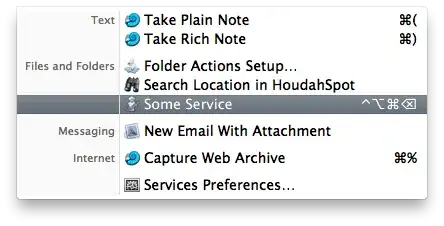
You can assign a keyboard shortcut via Application Menu, Services, Services Preferences. It's a bit difficult to assign backspace/"delete" to a keyboard shortcut (see comments on this answer) though.

You can alternatively create an application in Automator, and add a reference to the Finder toolbar (applications can be dragged there).


Assigning a keyboard shortcut using delete (backspace) or forward delete:

  1. Define a simple keyboard shortcut for the service without delete (e.g. Cmd-Ctrl-Opt-G) using System Preferences. Quit System Preferences.
  2. Open ~/Library/Preferences/pbs.plist using Property List Editor and copy the key for the service. It's within NSServicesStatus and looks something like (null) - Service Name - runWorkflowAsService. Quit Property List Editor.
  3. Open Terminal and enter the following command (use the line you copied earlier between the quotes and double-quotes):

    defaults write pbs NSServicesStatus -dict-add '"(null) - Service Name - runWorkflowAsService"' '{ "key_equivalent" = "@\U0008"; }'

  4. Open Application Menu » Services » Service Preferences, and toggle your service.

  5. Enjoy your new key combination.

In the command line, @ is Cmd, ^ is Ctrl, $ is Shift, and ~ is Option. Mix and match these modifiers to your preferences. \U0008 is delete (backspace), \U007F is forward delete.
alt text

Daniel Beck
  • 109,300
  • 14
  • 287
  • 334
  • Regarding assigning a keyboard shortcut using *delete*: `defaults write pbs NSServicesStatus -dict-add '(null) - My Service Name - runWorkflowAsService' '{ "key_equivalent" = "@\U0008"; }'` *should* work, but `(null)` (indicating a standalone service, not part of an application) is apparently not a valid key for `defaults`: *defaults[56054:903] Could not parse [the key]* – Daniel Beck Dec 15 '10 at 18:52
  • Thanks! I am doing this only for Finder, so it shows up in `com.apple.finder.plist`. Perhaps I'll change it to work for _All Applications_. What's the purpose of increasing the number value for `NSServicesUserDirectoryModDate`? I thinks `$` is Shift. What's fn? – ma11hew28 Dec 15 '10 at 19:46
  • @Matt Even if your service is only applicable to Finder, it's key combination is stored in `pbs.plist`. `Fn` is not a modifier key. If you want to go on with `Fn-Cmd-Delete` or similar, this is the exactly same thing as `Cmd-Forward Delete`. `Delete`'s code is `\U0008` above, I don't know the key code for forward delete. If you find it out, just put it into the command line of step 3 and it should work. – Daniel Beck Dec 15 '10 at 20:03
  • @Matt You could try `@\U007F` for `Cmd-Forward Delete`, `0x7F` is the ASCII key code for `DEL`. – Daniel Beck Dec 15 '10 at 20:05
  • 1
    Sorry, another edit is needed :-) as the following seems to work: `defaults write pbs NSServicesStatus -dict-add '"(null) - My Service Name - runWorkflowAsService"' '{ "key_equivalent" = "@\U0008"; }'` (Hence: double quotes within the single quotes. Not sure why I suddenly tried that!) – Arjan Dec 15 '10 at 20:57
  • @Arjan Good to know. I'm done for the night (central european time), will do that tomorrow. Not sure it's that much of an improvement here though, I think it didn't work for me without editing the timestamp. – Daniel Beck Dec 15 '10 at 21:03
  • I tested it with [my Open Super User example](http://superuser.com/questions/72468/how-can-i-program-the-function-keys-on-my-macbook/97813#97813). After using Terminal, each running program needs to be made aware of changes. Stopping System Preferences, opening it again and disabling and re-enabling the service did the trick. Maybe there's some command line option for that too. Unfortunately, for Delete the Keyboard section only shows "⌘", not "⌘⌫" in the Shortcuts... :-( – Arjan Dec 15 '10 at 22:17
  • (And `$` is Shift.) – Arjan Dec 15 '10 at 22:59
  • @Matt I edited to post after I verified that `\U007F` is indeed *forward delete* (i.e. `Fn+Delete`). You specifically want to use `"@\U007F"` for `Cmd-Fn-Delete`. – Daniel Beck Dec 16 '10 at 05:29
1

See this MacGeekery post.

Matt Ball
  • 3,752
  • 2
  • 25
  • 27
1

I'm not sure what the keyboard shortcut is or even if it exists but you can run an applescript that will permanently delete files. Here's a link with instructions http://macphobia.com/deleting-an-item-windows-and-mac.macphobia

user59325
  • 11
  • 1
0
set txt to ""
tell application "Finder"
    repeat with f in (get selection)
        set txt to txt & quoted form of POSIX path of (f as text) & " "
    end repeat
end tell
set cmd to "rm -rf " & txt
display dialog cmd & "?"
do shell script cmd

You can use FastScripts (or for example Keyboard Maestro) to assign a shortcut that's only available in Finder.

Lri
  • 40,894
  • 7
  • 119
  • 157