14

My Win 7 is installed on my laptop. When I use my mouse I am not always on a flat surface (ie on a couch or something like that) when I let go of my mouse to type it often moves a bit. When it does this it will often end up on the lower right hand corner of the screen. That causes all the windows to disappear!

This is super frustrating. Is there a way to just turn that "Feature" off?

Siim K
  • 7,832
  • 6
  • 51
  • 70
Vaccano
  • 6,636
  • 21
  • 60
  • 71

3 Answers3

24
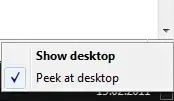
  1. Right-click on the "Show Desktop" button in the lower right corner
  2. Click "Peek at desktop" to uncheck it

Arjan
  • 30,974
  • 14
  • 75
  • 112
Siim K
  • 7,832
  • 6
  • 51
  • 70
  • 1
    Oh. My. GODS! This is so annoying!!! Before I start a rant how i HATE HATE HATE HATE this feature , let me tell you that this solution ALSO works on Windows 10! No-one has picked up on that little tid bit in 4 years. – GwenKillerby Jul 06 '17 at 16:02
3

This has not helped me at all. In order to change this rather annoying feature you will need to right click the properties of the task bar and deselect the Use Aero Peek option.

Monica M
  • 31
  • 1
  • 4
    You can also right-click the area at the bottom-right itself, and deselect the peek option. Same solution, it just saves one step. – Paul Jun 18 '13 at 13:30
1

To be clear, put the mouse IN THE LOWER RIGHT CORNER where it shows the desktop, THEN right click, and click to deselect the 'PEEK' feature.

Kiara
  • 11
  • 1