36

Back in Windows XP I knew that doing a file search and checking "Search file contents" (or whatever it was) I would get my results if I waited patiently.

In Vista, I felt I had absolutely no confidence that what I had typed had been thoroughly searched for, even with all the "Search non-indexed locations" etc. checked.

In Windows 7 I feel better and usually find stuff, but am suspicious when I don't. I'm not left feeling "confident".

I don't want (the weight of) Google Desktop.

I want a solid, brute file search utility. I found one I thought looked good recently (installed Windows 7 RTM last week and can't remember what it was called) but it still didn't seem to find files I placed as tests.

Cfinley
  • 1,435
  • 3
  • 14
  • 20
Josh Comley
  • 4,072
  • 13
  • 50
  • 50
  • 1
    Windows 7 search needs some getting used to. I find if you surround your search query word in wildcard `*` (e.g. when looking for a file that has the word `me` in it), NEVER just search for `me`, rather search for `*me*`. – bobobobo Jun 12 '10 at 16:58
  • You can make Windows 7 search file contents more thoroughly with the tips in [wikiHow: How to Make Windows 7 Search File Contents](http://www.wikihow.com/Make-Windows-7-Search-File-Contents). It tells you how to enable file content search by default, and enable file content search for individual file types for which it is turned off by default. – Rory O'Kane Jun 03 '13 at 16:25
  • 1
    Another one worth mentioning is [File Content Finder](https://geosytemsdev.com/products/file-content-finder/) on the [App Store](https://www.microsoft.com/en-au/p/file-content-finder/9mzc4sk6j6bp) (**disclaimer**: I'm the developer). It's a new tool (2019), and thus it hasn't been mentioned in the answers below. Doesn't require indexing. – Geo Systems Apr 16 '19 at 11:37

13 Answers13

40

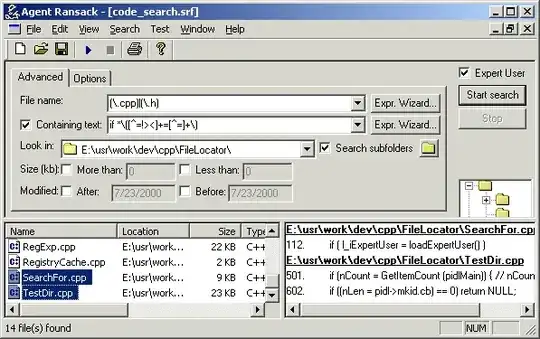
Agent Ransack is excellent -- it's fast, lightweight (single <1 MB application), powerful (regular expression matching of file names and content), and you can trust the results.

enter image description here

arathorn
  • 8,739
  • 4
  • 51
  • 69
  • 1
    Aaahh I remember this from a good couple of years back finding it! Super, perfect for my needs. Plus it supports Regular Expressions. Super! – Josh Comley Aug 20 '09 at 17:38
  • 3
    This is a very good program for precisely the reason that its behavior is so clearly defined.. vs Windows 7 search now, you really have no idea __what__ its going to do. – bobobobo Jun 12 '10 at 17:02
  • 3
    I LOVE Agent Ransack - it's a solid piece of software. I find the Windows 7 search results baffling. – Shane Sep 13 '11 at 18:31
26

You also have a perfectly good copy of PowerShell sitting there on your Windows 7 install:

Get-ChildItem C:\* -Recurse | Select-String 'foo'

You could even add an alias to your profile for Select-String called grep and then do:

ls C:\* -r | grep 'foo'
Peter Mortensen
  • 12,090
  • 23
  • 70
  • 90
EBGreen
  • 9,127
  • 1
  • 36
  • 40
19

I always use the find-in-files feature of Notepad++ for my brute-force searches.

MiffTheFox
  • 3,362
  • 8
  • 31
  • 37
5

Try using grep from GnuWin32. GnuWin32 has Windows implementations for most of the common Unix command-line facilities.

Peter Mortensen
  • 12,090
  • 23
  • 70
  • 90
Kristo
  • 644
  • 2
  • 6
  • 13
5

There is a pretty brute-force way using findstr:

findstr /s "some search string" *

You can even use regular expressions with the /r switch.

Joey
  • 40,002
  • 15
  • 104
  • 126
4

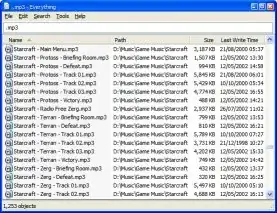
Try using Everything, which aims to provide instant search across all Windows systems.

enter image description here

Gaff
  • 18,569
  • 15
  • 57
  • 68
  • 8
    [From the FAQ](http://www.voidtools.com/faq.php#Does_Everything_search_file_contents): **1.3 Does Everything search file contents?** No, "Everything" does not search file contents, only file and folder names. – Rory O'Kane Jun 03 '13 at 16:19
  • 1
    This has since changed. From the same question in the FAQ: "*Yes, Everything can search file content with the content: search function. File content is not indexed, searching content is slow.*" – Hashim Aziz Aug 01 '17 at 17:47
4

Not many people are aware of Total Commander's advanced file search capabilities. This search can find files using wildcards, search for text within the files, read into most archives, search by file attributes and so on.

Yuval
  • 2,242
  • 3
  • 20
  • 18
3

You should have a look at Wikipedia's list, List of search engines, Desktop search engines. Ultimately, you're asking for our opinions, but if ours doesn't match up with yours, then you won't use the program. I would try a few on that list and see if you like them.

One popular engine is Agent Ransack (personal favourite) or Copernic Desktop Search (it has free and paid versions, and is Windows only).

Breakthrough
  • 34,227
  • 10
  • 105
  • 149
3

I use cygwin. Here's what works for me:

cd /cygdrive/c
find . -type f -print0 | xargs -0 grep "search string here"
Chris W. Rea
  • 10,740
  • 16
  • 76
  • 95
3

While I'm a great fan of Total Commander, the speed of Everything is just unrivaled.

If you're looking for a content search tool without risking your privacy, have a look at DocSearch, a small yet very efficient Java utility.

Peter Mortensen
  • 12,090
  • 23
  • 70
  • 90
1

Unix grep implementation for Windows by the famous Tortoise svn developers:

grepWin

Shell integration, comprehensive GUI, and free.

9dan
  • 333
  • 2
  • 5
0

FileSeek is pretty sweet too. Allows for more things than you can do with free version of Agent Ransack and is very fast.

Mrchief
  • 452
  • 6
  • 13
-1

There is a free tool to tag your files by author, item, time etc. It provides a web form to search by tags and content calling automatically Vista search function (see link text and its help section)