8

Thanks to the help I received in this thread, I was able to get Windows to default to the Dvorak keyboard layout for all new documents/windows.

There's just one catch.

I have to re-set it every time I log in.

When I open the Text Services and Input Languages dialog (accessible from the Regional and Languages control panel or by right-clicking on the Language Bar and clicking Settings...), It shows that Dvorak is the default keyboard layout, but all new windows/documents still default to QWERTY.

I can work around this issue by changing the default to QWERTY, clicking Apply, then changing it back to Dvorak and clicking OK. But it's kind of a pain to have to do this every time I log into Windows.

Does anyone know of a workaround or some way to permanently change the default keyboard layout in Windows Server 2008 R2?
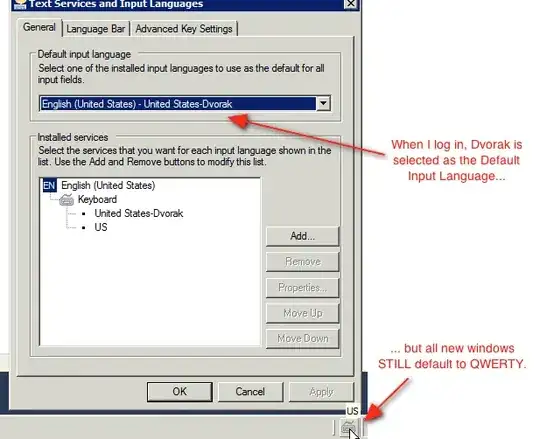
Screenshot showing Dvorak selected as the default input language, but the Language Bar is using QWERTY.

Here's what my registry looks like at HKEY_CURRENT_USER\Keyboard Layout:

  • Preload
    • 1: d0010409
    • 2: 00000409
  • Substitutes:
    • d0010409: 00010409
  • Toggle:
    • Hotkey: 3
    • Language Hotkey: 3
    • Layout Hotkey: 3

Note: I've noticed this behavior on a number of virtual instances, but it does not seem to occur on physical (non-virtualized) installations.

4 Answers4

2

I don't know about Server 2008, but I had the same problem on Windows 7. Where you choose the Dvorak layout, there's a little list view thing. You'll need to put Dvorak on the top. When Dvorak is the #1 keyboard layout (top), it should default to it.

EDIT: I think you might need to uncheck Auto Adjust when you right click on the keyboard icon, but I'm not sure.

I'm glad to see that I have another Dvorak-using compadre out there... the few and the strong.

beatgammit
  • 1,445
  • 2
  • 13
  • 17
  • 1
    Another Dvorak Typist here. Another option could be to remove QWERTY and adding it later... – Tamara Wijsman Apr 04 '11 at 15:11
  • Thanks for the suggestions. From the [linked thread](http://superuser.com/questions/244645/removing-qwerty-keyboard-layout-permanently), I did make sure that Dvorak was at the top of the list of keyboard layouts. I also tried removing QWERTY altogether, and I just tried unchecking Auto Adjust in the Language Bar's context menu. No dice; after a logout-login, Windows goes back to defaulting to QWERTY. –  Apr 04 '11 at 20:01
  • I actually don't think Auto Adjust does anything, but it was worth a shot. Did you set Dvorak to be the default keyboard layout? If QWERTY is not installed, it shouldn't even be able to be used... – beatgammit Apr 04 '11 at 22:00
  • @tjameson Yes, one would think that if QWERTY is removed, the OS would have no choice but to default to a keyboard layout that is actually present. Windows is apparently inclined to disagree with such reasoning. I am able to get Windows to default to Dvorak for new windows, but what's weird is that I have to switch it back to QWERTY and then back once again to Dvorak every time I login or restart, or else Windows goes right back to defaulting to QWERTY (even though the control panel already SAYS that Dvorak is the default when I login/restart). –  Apr 05 '11 at 16:01
  • Remove the "US" layout entirely and reboot. You could also try [this](http://forums.techarena.in/windows-xp-support/1395713.htm) – beatgammit Apr 05 '11 at 16:56
  • @tjameson Thanks for continuing to look into this. I have tried removing the US layout entirely. Unfortunately, the behavior persists, and as a bonus, I can't even use my workaround because there are no other keyboard layouts to switch to. I'll try the solution from the forum thread you posted and see if that has any effect. –  Apr 07 '11 at 03:34
  • @tjameson I tried copying the keyboard layout settings to reserved accounts per the forum thread you posted. Although it did fix the default layout for e.g., when the computer is locked (haven't tested after a restart yet), when I logout/login, the problem comes back. –  Apr 07 '11 at 15:29
  • Do you mean that the keyboard layout is wrong on the login screen? Or do you mean that the keyboard layout is wrong after you login? – beatgammit Apr 07 '11 at 17:11
  • @tjameson After applying keyboard layouts to reserved accounts, the login screen uses the Dvorak layout, but once I log back in, Windows goes back to using QWERTY as the default. –  Apr 07 '11 at 21:20
1

The keyboard layout is contained in the registry key HKEY_CURRENT_USER\Keyboard Layout.
The REG_SZ item "1" contains the first layout, "2" the second, etc.

The article Windows Keyboard Layout lists most keyboards ids. You would also find your above layout ids defined as sub-keys of the registry key
HKEY_LOCAL_MACHINE\System\CurrentControlSet\Control\keyboard layouts.

Analyzing your registry info :

Preload determines which keyboard layouts are present in the keyboard switch button (on the bottom right of the taskbar), and the number determines the ordering. You have two of them : d0010409=Dvorak English and 00000409=US English. This list order does not mean much more than that.

Substitutes maps the value d0010409 to the layout 10409 which is also Dvorak. I assume that the changing of the upper half of the key code isn’t significant and is properly mapped by the substitutions hive.

What is missing is perhaps the substitution that maps 00000409 (US) to 00010409 (Dvorak). This can be done by entering it manually, or by the command :

reg add "HKCU\Keyboard Layout\Substitutes" /v 00000409 /d 00010409

When changing the registry take all due precautions : Create first a system restore point and also export the entire registry key.

harrymc
  • 455,459
  • 31
  • 526
  • 924
  • Thanks for the suggestions. I will respond to this tomorrow. –  May 03 '11 at 00:51
  • You could also try booting in Safe mode : If this doesn't happen, then it is some application that is switching your keyboard. – harrymc May 03 '11 at 04:57
  • Added registry info to the OP. –  May 03 '11 at 18:12
  • Registry data analyzed above. – harrymc May 04 '11 at 09:18
  • Thanks for the suggestion. I tried the registry change you recommended, but it did not fix the issue after a logout/login. –  May 04 '11 at 15:04
  • Could you try the registry change again, but followed by a reboot into Safe mode? – harrymc May 04 '11 at 15:44
  • Unfortunately, I don't think I will be able to do this; the instance in question is on AWS EC2. –  May 04 '11 at 16:01
  • Can you at least reboot, instead of logout/login, ensuring before that the registry change is ok ? – harrymc May 04 '11 at 16:28
  • I tried restarting the instance. The registry change was persisted, but QWERTY was still selected in the language bar. This also had the side effect of removing QWERTY from the list of installed keyboard layouts in the R&LS control panel. –  May 09 '11 at 14:30
  • Your settings seem all loused up. I would try to see what is the situation on a fresh install (or a virtual machine). – harrymc May 09 '11 at 14:40
  • This problem is probably specific to virtual instances, as I haven't noticed it on physical installations. I'll mark this as an accepted answer because it is the most thorough. Thanks for looking into this! –  Jun 01 '11 at 14:39
0

Try reversing the Susbstitutes entry to

00010409: d0010409

d0010409 should be Dvorak.

See here for documentation.

Daniel Beck
  • 109,300
  • 14
  • 287
  • 334
  • Thanks for the suggestion. I tried adding a new entry to `Substitute` per your instructions, but it did not appear to have any effect after a logout/login. –  May 04 '11 at 15:08
  • @Phoenix not adding, try replacing. – Daniel Beck May 04 '11 at 15:18
  • Okiedokie. I'll try replacing the existing entry. –  May 04 '11 at 15:20
  • I tried replacing the entry. After a logout/login, I found that Dvorak had been removed from the list of keyboard layouts entirely (QWERTY was still being used everywhere). After I restored Dvorak in the list of installed keyboard layouts, I went back to regedit, and I found that my change had consequently been reverted. –  May 04 '11 at 15:25
  • @Phoenix Interesting -- sorry for wasting your time, I wasn't on Windows at the time, but the docs looked good. – Daniel Beck May 04 '11 at 15:26
  • No worries; thanks for looking into it. I'm pretty sure we're looking at a bug in Windows here, so I'm expecting the workarounds to be... speculative. –  May 04 '11 at 16:02
0

Windows DVORAK for me has been a pain since the start... what i've done (as i terminal service into other workstations and/or ssh into systems) is utilize a keyboard that has dvorak implemented on the actual keyboard.... that way i can share a virtual terminal with colleagues and still get dvorak just the way i want.

my keyboard is here:

http://typematrix.com/

joefromct
  • 101
  • 1