2

Possible Duplicate:
How to add an item to my “Send To” context menu

Right clicking on a file gives a "send to" option.

How may I send a file to any other location other than the standard ones:

  • Mail Recipient
  • My Documents
  • Shortcut to desktop
  • Compressed File
nish
  • 121
  • 4
  • 1
    You can add a shortcut to application / folder to c:\documents and settings\username\sendto (which is a hidden folder. –  Apr 05 '11 at 14:05

1 Answers1

3

How to customize the Send To menu.

To get to the SendTo folder, you’ll need to open up an Explorer window, and then paste in the following to the address bar.

%APPDATA%\Microsoft\Windows\SendTo

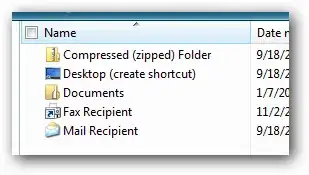
You should now see a bunch of shortcuts: .

enter image description here

Let’s say you wanted to add an item to the Send To menu to open files in Notepad. You could just drag a shortcut to Notepad into this folder, or create a new shortcut. Now you can see the new Notepad item in the menu:

Source of Information

Moab
  • 58,044
  • 21
  • 113
  • 176