Is there a way to always open bookmarks in a new tab in Opera?
Asked
Active
Viewed 3,794 times

3 Answers
10
You can have it so that all bookmarks open up in new tabs by setting it in your preferences:
Tools > Preferences > Advanced > Tabs
Or Ctrl + F12
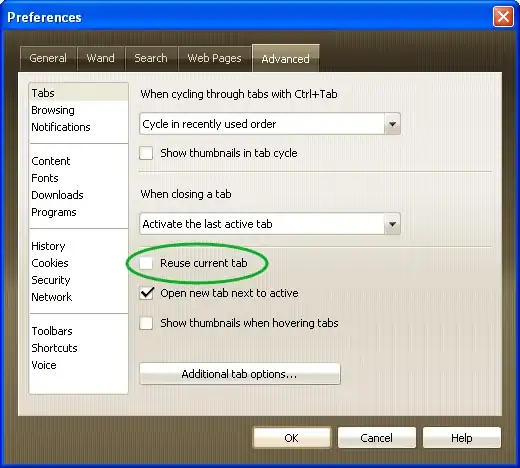
Then uncheck Reuse current tab.
To be double sure, click on Additional tab options....
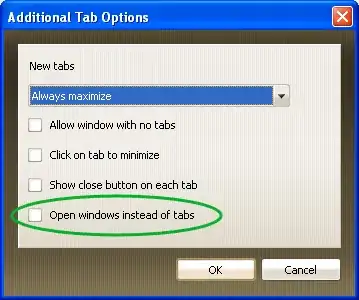
Make sure that Open windows instead of tabs is also unchecked.
Click OK to save the changes.
Now, when you open a bookmark, or a favourite from the Personal Bar, it will open up in a new tab.

random
- 14,638
- 9
- 54
- 58
0
I don't know about Opera but in Chrome (and I think Firefox) you can open bookmarks in a new tab by clicking on them with the scroll button.
Maybe it works in Opera as well?

sippa
- 2,589
- 3
- 18
- 13
-
Works in Chrome and Firefox, but not Opera. – Tester101 Aug 21 '09 at 15:18
-
1This works in every single browser. The only thing that might differ is whether the tab opens next to the current one, or at the end of the line of already opened tabs. – KdgDev Aug 21 '09 at 15:18
-
I sure hope it does work in Opera, it's a feature I can't live without. – sippa Aug 21 '09 at 15:21
-
2This works for links, but not for bookmarks. – Bruce Alderman Aug 21 '09 at 15:24
-
In fact, it works with the actual bookmarks (from the bookmark panel on side), but it doesn't work for the bookmarks from the "personal bar", simply (and yes, this is annoying... this personal bar in Opera is the only thing I prefer in other browsers...) – Gnoupi Aug 21 '09 at 15:57
0
Not sure about Opera either, but in Firefox and Chrome you can click any link/bookmark while holding CTRL to open it in a new tab.

FrankS
- 210
- 2
- 5