35

I'm having trouble setting up PuTTY with Ubuntu.

I'm trying to get line characters to work in aptitude as well as 256-color support, but can only get one or the other.

  • Ubuntu Config
    • Using 64-bit Ubuntu
    • Terminal type xterm-256color or putty-256color gives 256-color, but incorrect line characters.
    • Terminal type linux gives proper lines in aptitude, but only 16 colors.
  • PuTTY Config
    • Using font with Unicode characters. (DejaVu Sans Mono)
    • Received Data is assumed to be in UTF-8.
    • Set to use Unicode line drawing code points.

Output from locale:

LANG=en_US.UTF-8
LANGUAGE=
LC_CTYPE="en_US.UTF-8"
LC_NUMERIC="en_US.UTF-8"
LC_TIME="en_US.UTF-8"
LC_COLLATE="en_US.UTF-8"
LC_MONETARY="en_US.UTF-8"
LC_MESSAGES="en_US.UTF-8"
LC_PAPER="en_US.UTF-8"
LC_NAME="en_US.UTF-8"
LC_ADDRESS="en_US.UTF-8"
LC_TELEPHONE="en_US.UTF-8"
LC_MEASUREMENT="en_US.UTF-8"
LC_IDENTIFICATION="en_US.UTF-8"
LC_ALL=
sm4rk0
  • 726
  • 1
  • 6
  • 19
Swiss
  • 516
  • 1
  • 5
  • 15

2 Answers2

46

The problem is that PuTTY in UTF-8 mode ignores1 VT100 "Alternate character set" commands, and ncurses attempts to use the "graphical" character set for drawing the GUI. (The box drawing characters are in the same positions as klmqx would normally be.)

export NCURSES_NO_UTF8_ACS=1 to your environment, it should fix the problem by telling ncurses to always use Unicode box drawing characters when a UTF-8 locale is selected.

1 There is a PuTTY wishlist entry for this, along with explanation why the current behavior is better.

Update (2018-05-12): It seems that this combination will be supported in PuTTY 0.71.

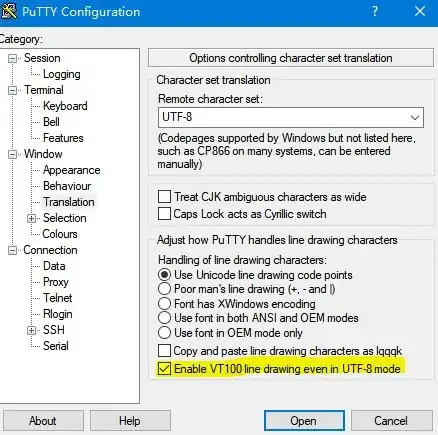
Update: PuTTY now has the option "Enable VT100 line drawing even in UTF-8 mode" in the settings Window -> Translation.

u1686_grawity
  • 426,297
  • 64
  • 894
  • 966
  • That's interesting. I just always used Lucida Console because the line drawing always just worked in UTF-8 mode. Now I can use much better fonts. Thanks. :) – Ariel May 03 '11 at 19:34
  • 8
    I just want to point out that running through a program that converts the alternate character set to UTF-8 also fixes the problem. I found this from the link you provided. The best example program is screen. – Swiss May 04 '11 at 06:35
  • 3
    not to dig up old posts, but [KiTTY](http://kitty.9bis.net/) - a PuTTY fork - provides a checkbox to "Allow ACS line drawing in UTF" (new/current session settings->Window->Translation) which seems to work well with apps like aptitude. – aquafunk Sep 25 '16 at 17:44
  • 1
    @swiss: it is not **`screen`** which does the conversion, but **`ncurses`**. – Thomas Dickey Oct 01 '16 at 14:47
  • I am working in Putty and using zsh. I am having a similar problem as OP, in that in VIM, certain characters such as arrow in NERDtree are not being display. When I do "export NCURSES_NO_UTF8_ACS=1", and open VIM again, it doesnt do anything different. The arrows are still not displayed. Any idea whats going on? – alpha_989 Nov 11 '17 at 20:34
  • @alpha_989: That's not the same problem at all, as arrows weren't part of the ACS in the first place. They're already purely UTF-8. What do you see in their place? – u1686_grawity Nov 11 '17 at 21:25
  • @grawity, if I am on the remote server, I see this: https://imgur.com/R0T4hO5 – alpha_989 Nov 11 '17 at 22:25
  • I see the arrows as expected in NERDtree. However, if I am loggin in through ssh, I see the arrows become replaced by boxes. https://imgur.com/cfejBDi – alpha_989 Nov 11 '17 at 22:26
  • I have tried all the solutions posted on this thread here, but it didnt solve it: https://serverfault.com/questions/475925/how-to-fix-putty-showing-garbled-characters. But as you pointed out maybe the problem is not the same. Any idea how to debug this, or the root cause of this issue? – alpha_989 Nov 11 '17 at 22:31
  • Ok.. I solved it myself. Just in case somebody else has the same problem heres the solution: https://github.com/scrooloose/nerdtree/issues/522#issuecomment-163673920 You can use the default Consolas font as well – alpha_989 Nov 11 '17 at 22:57
12

This is now implemented as an option in PuTTY git master.

Putty 0.71 ->

Category -> Window -> Translation -> tick "Enable VT100 line drawing even in UTF-8 mode"

screenshot

Daniel
  • 842
  • 7
  • 19
ismail
  • 609
  • 5
  • 8