3

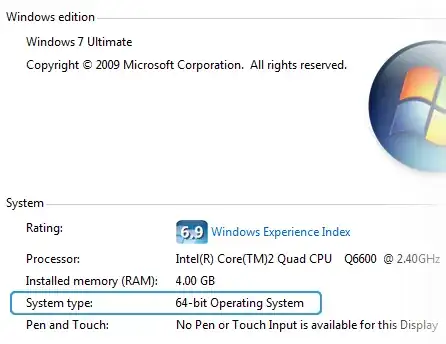
I have installed Windows 7 64-bit Ultimate edition on my laptop and now i want to upgrade it into Windows 7 64-bit sp1 Ultimate edition. But installer tells me you cannot upgrade because:

  • You can’t upgrade 64-bit Windows to a 32-bit version of Windows. To upgrade, obtain a 64-bit version of the installation disc, or go online to see how to install Windows 7 and keep your files and settings.

  • 32-bit Windows cannot be upgraded to a 64-bit version of Windows. To upgrade, obtain a 32-bit version of the Windows installation disc.

I'm sure my laptop OS and disc is 64-bit version of 7. How can i upgrade my Windows?

Sadegh
  • 131
  • 1
  • 5
  • Are you trying to "update" by using a W7 DVD with SP1 integrated, or are you just trying to install the SP1 update itself? SP1 itself you can get through Windows Updates or you can download from MS. If using a W7 DVD with SP1 integrated, then it would seem the DVD you are using is in fact a 32-bit version. (Don't think an "update" would work in that case anyway, you would have to do another install.) http://windows.microsoft.com/en-US/windows7/learn-how-to-install-windows-7-service-pack-1-sp1 – therube May 14 '11 at 17:36
  • I'm using Windows 7 SP1 DVD. I'm absolutely sure my DVD is 64-bit! – Sadegh May 14 '11 at 18:21

1 Answers1

0

It sounds like you have a 32-bit version of Windows 7 installed. Push Winkey+PauseBreak and check out what it says about the architecture at the bottom.

Architecture

ta.speot.is
  • 14,205
  • 3
  • 33
  • 48