3

I own a copy of Cyberlink PowerDVD 9 Ultra, but to my dismay, my new copy of The French Connection plays really jerkily. I'm guessing it's something to do with the bitrate as scenes always play back the same way, jerking at the same moments. Plus, if I start opening menus in PowerDVD, the playback starts jerking more. Also, darker scenes play very smoothly, but brighter scenes are choppy.

It's annoying because this is the first ever Bluray I've owned to do this :( Every other one has been perfectly fine (Inception, Into the Wild, Kiss Kiss Bang Bang, Toy Story 3, Baron Munchausen, The Alien Anthology, Let the Right One In... all fine!). Online reviews mention nothing about jerkiness with The French Connection, so I'm guessing it's just my set-up.

Here's my specs:

PROC: Intel E6600 Core2Duo 2.40GHz
RAM: 4GB (4x1GB) CorsairTwinX XMS2, DDR2 PC2-6400
MOBO: Gigabyte 965P-DS3P
GFX: XFX 8800GTS PCI-E 320MB
OS: Windows 7 x64 (very clean installation)

I'm guessing this isn't fast enough for some Blurays? :(

With this in mind, what's the easiest (and cheapest) way to get this Bluray to play smoothly? I figured there might be a really lightweight bit of BD software? Or maybe I just need to buy a new GFX card? :'(

Any ideas? Thanks!

UPDATE
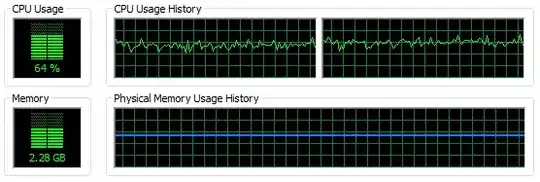
Here's a screenshot of the CPU usage during several minutes of playback (including choppy scenes).
enter image description here

Wherever the bottleneck is, it's not the CPU or RAM, it seems.

Django Reinhardt
  • 4,434
  • 8
  • 52
  • 85
  • 1
    well it's not your video card(newegg says it's hdcp ready...that means blu ray should work with it). i would think it's most related to the particular disc. have you tried renting the same movie? weirder things have happened – RobotHumans May 28 '11 at 05:10
  • Thanks for your advice aking. Now I'm really wondering what's going on? Hmm :( Maybe I need to rid myself of some background services or something. I suppose you're right though, it could be a poorly mastered disc. – Django Reinhardt May 28 '11 at 10:39
  • It would be interesting to know the CPU load during playback. – Tobias Plutat May 28 '11 at 10:45
  • @Tobias, Added to the original question for you. – Django Reinhardt May 28 '11 at 11:19
  • I agree. I'd guess it's just something about the disc, may be a manufacturing error. – Tobias Plutat May 28 '11 at 11:45
  • Not necessarily. Blurays use the GPU more than the CPU, don't they? – Django Reinhardt May 28 '11 at 11:52
  • An 8800GTS is a powerful card, it shouldn't have much problem merely decoding – Phoshi May 28 '11 at 11:58
  • Could it be sound related? I have a pretty old soundcard (Soundblaster Audigy). – Django Reinhardt May 28 '11 at 12:01
  • Another possibility is that they put intentional read errors in there as a "copy protection" mechanism. Stand alone players often skip these errors, where a computer will try to read them again. You could try feeding it to some blueray ripping software and seeing if the skips get corrected(there's usually a fast skip read errors option) – RobotHumans May 28 '11 at 14:57
  • Interesting. If that was the case though, you'd think others would probably have encountered it. (If you search for "French Connection Choppy"... you get my question as the top answer :( ) Still, might be worth a try. – Django Reinhardt May 28 '11 at 20:31

1 Answers1

0

As it turns out, it was my graphics card. Apparently a GeForce 8800GTS just isn't good enough for this particular Bluray disc. I switched it out for a Radeon HD 6870 (and kept everything else the same) and the movie played fine. Completely smooth.

(I'm guessing the grain has something to do with keeping the bitrate especially high or something?)

Django Reinhardt
  • 4,434
  • 8
  • 52
  • 85