As we know, in Windows the partition location is prefixed with [a-z]:. What happens if there are more than 26 partitions?
Asked
Active
Viewed 8,997 times
45

3 Answers
49
The drive letters you see are simply representations of the physical partitions available and can be represented by other means. You could only have up to 26 drive letters, but you are definitely able to have (and actually use) many more partitions.
In that case, you could link the drive to a directory on your system rather than a drive letter as, since Windows XP at least (and potentially earlier), it has been possible to mount a drive or partition under a directory in Windows. This would mean you could effectively have a folder containing all your drives that are not accessible by drive letter.
You would do this within the Disk Management administrative console.
To get to the console, go to (or right-click on "My Computer" -> "Manage" -> "Disk Management"):
Start > Run and type
diskmgmt.msc
If you right click a partition you would see a Change Drive Letter or Path option which where you can add or remove paths or drive letters for drives.
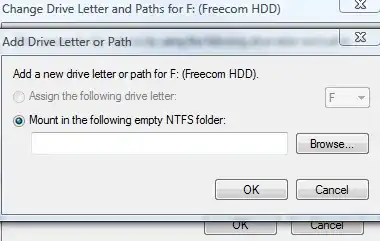
As a side not you will want to make sure that the folder that you are using is empty, when you mount a partition to that folder then you will only see the files and folders from that partition and any original files will be invisible. I suspect if you unmount the drive from that folder you will be able to see the original files again, but I don't know for certain.
Weird, I assumed that there would be some kind of limit on how many logical partitions you can have in an extended partition, but I can't actually find anything about it. I know you can only have four primary partitions.
This is an example drive that I have removed the drive letter from and instead assigned to a folder, the files on that drive are now accessible at C:\Temp\Test and the drive no longer has a letter assigned to it:

Peter Mortensen
- 12,090
- 23
- 70
- 90

Mokubai
- 89,133
- 25
- 207
- 233
-
6Logical partitions are implemented as a linked list, so there is no theoretical limit to the number you can have. – Ignacio Vazquez-Abrams Jun 07 '11 at 08:25
-
@Ignacio Vazquez-Abrams,what's their symbolic name like when 26 letters are used up? – winuser Jun 07 '11 at 08:26
-
1You can't have more than 26 letters, period. – Ignacio Vazquez-Abrams Jun 07 '11 at 08:28
-
@Ignacio Vazquez-Abrams ,26 logical partitions need 26 letters at least,right? What about the 27th partition? – winuser Jun 07 '11 at 08:29
-
There are no letters left for it. – Ignacio Vazquez-Abrams Jun 07 '11 at 08:30
-
@Ignacio Vazquez-Abrams ,so the number of logical partitions is limited,right? – winuser Jun 07 '11 at 08:34
-
7@Winuser, the 27th partition would not be able to have a drive letter and so you would have to assign it to a folder as I mentioned in my answer. The Disk Management console allows you to see unassigned partitions and then assign them to a folder as necessary. Have a look at http://i.technet.microsoft.com/dynimg/IC235918.png for an example of what you would see. – Mokubai Jun 07 '11 at 08:35
-
@winuser: No. Some of them will simply not have drive letters assigned. – Ignacio Vazquez-Abrams Jun 07 '11 at 08:36
-
@winuser Ignacio stated that the number of partitions is unlimited, but what is limited is how many drive **letters** can be assigned which is something completely different. A drive letter is only a **representation** of a partition and it can be represented in many different ways, for example as a folder. – Mokubai Jun 07 '11 at 08:38
-
@Mokubai,Is the `OFFICE12` a folder ? – winuser Jun 07 '11 at 08:42
-
Uh, no, it's a disk label. Finish reading the text in the picture. – Ignacio Vazquez-Abrams Jun 07 '11 at 08:51
-
I don't find any folders in that picture ...Only 3 partitions,namely `C:` , `D:` and `R:`. – winuser Jun 07 '11 at 08:55
-
@winuser It wasn't a particularly good image to demonstrate the "folder" idea, I was mainly using it to show the console where you would be able to get that information. – Mokubai Jun 07 '11 at 08:59
-
@winuser I've added a better image to my answer. Essentially a *physical partition* can be represented by either a drive letter or a folder and these are simply "links" to that disk and are nothing more than representations to make it easier for the user to see and interact with that drive. Microsoft could completely abolish the "drive letter" idea with little or no problems and people could have folders that represent their partitions, the reason they don't is simply that people are used to the idea of drive letters. – Mokubai Jun 07 '11 at 09:09
-
1For what it's worth: If we are talking **theoretical** limits then there most definitely _is_ such a limit. Each secondary partition takes a minimum of one sector for the partition itself (in these modern times where we don't do pointless cylinder alignment any more) and one (possibly two for some LVM schemes) sector(s) for the partition metadata. Since the container primary partition is limited to 2**32 sectors, at least one theoretical limit on the number of contained secondary partitions is fairly easy to deduce. (-: – JdeBP Jun 07 '11 at 09:09
-
@Mokubai ,how did you open that console in win7? – winuser Jun 07 '11 at 09:20
-
@winuser you can either right click "My Computer" and select "Manage" then look for "Disk Management" in the list on the left hand side, or you can click Start -> Run and then "diskmgmt.msc" to open the console – Mokubai Jun 07 '11 at 09:28
-
1You forgot to specify that mounting volumes as folders only works if the lettered drive is NTFS. – Synetech Sep 15 '12 at 13:53
12
Under DOS 3.3 at least you could get drives like [:\ i.e .the ASCII characters after Z.
This was using Novell and setting LASTDRIVE to some high letter.
So there might be a way of getting the 27th partition to have a character name.

Kevin Panko
- 7,346
- 22
- 44
- 53

mmmmmm
- 6,013
- 29
- 32
-
11Still can be done in WinNT using `subst` (which calls `DefineDosDevice()`), but most GUI programs won't recognize `[:\Users` and the like :( – u1686_grawity Jun 07 '11 at 10:32
-
I suspect that most programs, period, won't recognize paths such as `[:\Users`, since the assumption is that drives are marked with a letter. There is, of course, the new style path format that's used for network drives (for example `\\ServerName\Path`) that came into existence at about the same time as Windows 95 or thereabouts. Not sure if you could map an unlettered drive to such a path for use locally, though. – RobH May 29 '14 at 16:51
-
1@grawity: It seems to even let you specify a space as a drive letter. Interesting. – LawrenceC May 29 '14 at 17:18
1
Little-known undocumented feature: you can use any drive "letter" you want with the mountvol command. First, use mountvol undecorated to get a list of present volumes with their \\?\Volume{GUID}\ paths. Then, you can do something like this:
mountvol -: \\?\Volume{7d0832b2-3d3a-4fe0-9473-9f7aaabc5a98}\
-:
That - isn't a placeholder - it actually works as a drive identifier, and you can change your current drive in the command prompt to it, cd around, and do everything you'd expect to be able to do. As far as I can tell, every symbol except the space works.
Explorer won't let you browse in non-lettered drives, but you can open some programs on documents in them. notepad filename.ext works on the prompt from inside that drive, for instance. (But notepad -:\filename.ext doesn't work from the Run dialog.)

Ben N
- 40,045
- 17
- 140
- 181