1

During the Windows 7 install what is the best way to go about setting up a computer for use with limited user accounts?

Essentially, when it prompts me to create a user (see below) what should I do in order to set Windows up for limited user accounts?
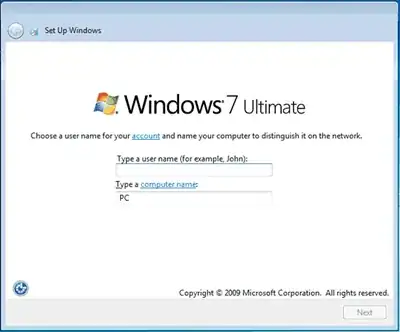
install prompt

Should I create an admin account and then delete it after the install, or is there someway I can create limited user during the install? What is the best practice here?

James McMahon
  • 3,438
  • 9
  • 36
  • 36

2 Answers2

3

What ever you type on that screen will be a user with Admin rights (assuming this is a home PC with no group policy or anything else in the mix.)

Once the install is done, setup your "limited accounts."

I'm not sure if you will be able to delete your admin account, as you will need admin rights to do so. There is also the system Administrator account but it is not active by default (usually.)

Windos
  • 11,061
  • 4
  • 38
  • 56
  • You might need the admin account, just don't use it for day-to-day activities. – ChrisF Jun 08 '11 at 22:56
  • 3
    You can delete the initial admin account, but you need to enable the administrator account. That you cannot delete. – KCotreau Jun 08 '11 at 22:59
  • Left in the same boat if you enable the Administrator account and delete the initial (i.e. having one active admin account). Might as well just name the initial one something useful for you and use that. Either way you will have (at least) one active admin account. – Windos Jun 08 '11 at 23:17
  • I ended up creating a temp admin account, enabling the admin account and deleting the temp account. – James McMahon Jun 09 '11 at 02:50
1

Here's a naming convention I like for two accounts: usernameAdmin for admin privileges, username for limited account. (SteveAdmin and Steve, e.g.)

I second the above: you must have one user account with admin privileges/in the admin group. If you delete all admin user accounts, you will be stuck.

w3steve
  • 11
  • 3
  • What's the value in having an admin account for each username? I just use the single built in Administrator account. – James McMahon Nov 14 '11 at 17:03
  • On the question of admin account for each username you are right; I was setting up a personal single-user machine. For your 2nd comment, I believe that it's safer to do admin tasks with a user account with admin privileges, and that the built-in Administrator account is dangerous overkill (but I may be wrong). – w3steve Nov 16 '11 at 23:22
  • I wasn't aware there was a difference between the built-in admin account and an account with admin privileges – James McMahon Nov 17 '11 at 22:15