4

Remote Assistance is enabled on a PC to-bo-controlled-remotely which is running Windows 7 Starter.

I also allowed permanent access for it on the firewall.

On the controlling Windows XP Professional laptop I enabled Offer Remote Assistance using gpedit.msc.

Both are on the same Workgroup and on the same subnet in my LAN.

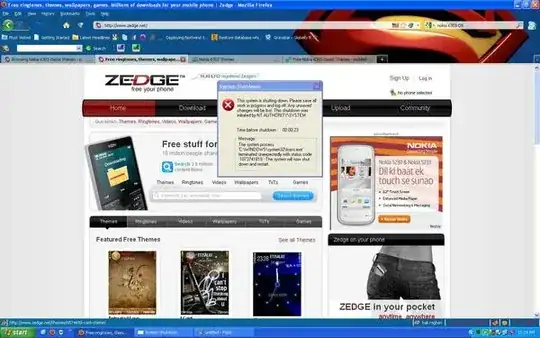
But I still receive Permission Denied when I attempt to connect:
enter image description here

Any idea what I could be missing and how to troubleshoot this problem?

ef2011
  • 409
  • 1
  • 7
  • 14

3 Answers3

3

You can't use Remote Assistance if the "Novice's computer" runs Windows 7 Starter.

This is because you can't run gpedit.msc on Windows 7 Starter and if you notice @KCotreau's link, running gpedit.msc on the Novice's computer is a requirement.

(yes, this is despite having the Remote Assistance option in the Computer properties on Windows 7 Starter)

As @KCotreau suggested your only recourse is a third party application like UltraVNC or TeamViewer.

My personal favorite: open source TightVNC. So easy to install and use, I sometimes wonder what was in the minds of the geniuses who designed "Remote Assistance"...

rAndy
  • 158
  • 6
2

Follow this document: http://support.microsoft.com/kb/310629

and check this:

http://support.microsoft.com/kb/884910

Have you set a user password? It cannot be blank.

If all else fails, TeamViewer is better and very easy to use. http://www.teamviewer.com/en/index.aspx

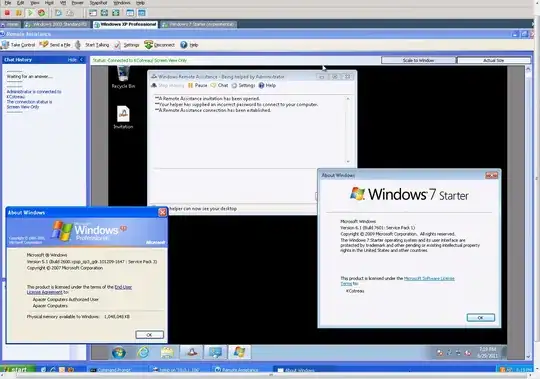
It can be done, and by default. I did not have to make any changes other than to allow the offers from XP.

enter image description here

KCotreau
  • 25,519
  • 5
  • 48
  • 72
  • @KCotreau Thank you! In my searches for solution I did encounter the 2nd link but my situation is opposite (the remote computer is 7 Starter, not XP SP2). I need to explore the 1st link. I may have `Simple File Sharing` on that 7 Starter machine, but I couldn't find any reference to it by this name. Where can I find the `Simple File Sharing` on Windows 7 Starter? (so that I can turn it off :) – ef2011 Jun 27 '11 at 18:32
  • 1
    I can't be sure about Starter, but it is probably in the same location: Open Computer, hold down the ALT key, and then go to Tools>Folder Options>View and it has traditionally been near the bottom of the list, on Ultimate, you would uncheck "Use sharing wizard". – KCotreau Jun 27 '11 at 18:35
  • @KCotreau You are king. With your instructions I was able to find that `User sharing wizard` and uncheck it (it was checked!). The `Permission Denied` error persists however so there must be one more thing I need to do. I am sure I will find it but... those who **truly** need remote assistance - how on earth are they supposed to make sure that all the stars are aligned properly and moon is in the right phase? – ef2011 Jun 28 '11 at 00:27
  • 1
    @ef2011 Thank you. They should just use TeamViewer. :) – KCotreau Jun 28 '11 at 00:35
  • @KCotreau For the life of me I still can't make Remote Assistance work. I know about the excellent TeamViewer but my goal right now is to understand **why** can't `Remote Assistance` work for me and **how** to complete what I have already started to make this work. Any further help you can provide would be greatly appreciated. Thanks. +1 of course. – ef2011 Jun 29 '11 at 00:20
  • 1
    @ef2011 I have some important work to do tonight and tomorrow, but I will try to contact you after and see if we can figure something out. – KCotreau Jun 29 '11 at 00:45
  • @KCotreau Thank you. However, after reading rAndy's answer, I tried running gpedit.msc as instructed in your link and it turns out that he was right: There is no way to run gpedit.msc in Windows Starter. – ef2011 Jun 29 '11 at 12:51
  • 1
    @ef2011 You accepted too quickly. I was going to offer to do a remote session, ironically using TeamViewer, and see what you might be doing wrong. I loaded up a copy of Windows 7 Starter today on a virtual machine, and got it to work in minutes. It can be done, and without extraordinary effort. In the screenshot, inside of VMWare, you can see both the XP box, and the Win7 Starter being controlled. – KCotreau Jun 29 '11 at 23:24
  • @KCotreau Thanks but I am not interested in a remote session (regardless of whether it is via TeamViewer or Remote Assistance). I am really interested in an **absolutely complete** checklist that if I make sure that each and every condition is fulfilled, then there would be no reason for `Offer Remote Assistance` to not work. At this point this checklist appears to be infinite... BTW, when I send invitation from the "novice's computer", Remote Assistance works flawlessly. It is only the *Offer* that doesn't work. Thanks and + 1 again for your readiness to help. – ef2011 Jun 30 '11 at 23:13
  • 1
    @ef2011 The point is that it was something specific to your computers...not necessarily Windows. I would have like to try setting it up myself to see. It is possible that you just missed something. There was no real checklist, I sent an invite from the windows starter, opened it on the XP, and put in the password, which was ALL CAPs, and case sensitive. It jsut worked with no other configuration. As I entered the password, I was wondering if yours was also all caps, and if you entered it that way. – KCotreau Jun 30 '11 at 23:24
  • @KCotreau Aha! Did I catch you writing "*I sent an invite from the windows starter*"? :) If so, that works for me, too! What doesn't work is the "*Offer*". Does "*Offer*" work for you? – ef2011 Jun 30 '11 at 23:31
0

From the Windows 7 machine, get the user to open Remote Assistance and send you an invitation for help, by email. For some reason, this seems to work for our corporate network where a direct offer of assistance from XP to Windows 7 does not.

Highly Irregular
  • 2,943
  • 18
  • 40
  • 54