Is it possible to open Add/Remove programs from freecommander? Not by opening My computer?
Asked
Active
Viewed 326 times

2 Answers
0
- In freecommander : Settings-->Shell menu-->Add FC to context menu : tick folders and drives
- Control panel--> folders options --> file type--> Go to Drives or Files folders, click on advanced, then set Freecommander as default.
This will set Freecommander above Windows Explorer

admintech
- 7,046
- 2
- 28
- 43
-
I can't find advanced in Drives and Folders – Sergey Jul 07 '11 at 14:54
0
Yes!
FreeCommander has a toolbar icon to see all the Control Panels:
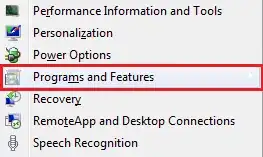
When you click on it, it pops up a menu of all your Control Panels, containing "Add/Remove Programs" (pre-Vista) or "Programs and Features" (Vista and Windows 7):
Better still, although it's quite pale in the screenshot, that item has a sub-menu, which shows each of the installed programs:
Depending on how much you've got installed, and the speed of your PC, it can take a second or two to populate these menus, but it is still very convenient.


Clare Macrae
- 1,879
- 7
- 21
- 35