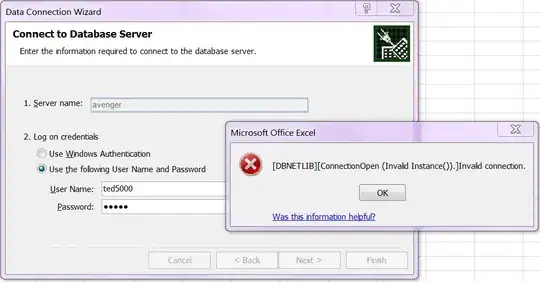
I am trying to connect to Microsoft SQL Server 2008 R2 from Excel 2007. When it tries to connect I get the error:
[DBNETLIB][ConnectionOpen (Invalid Instance()).]Invalid connection.
Steps to Reproduce
- On the Data tab, in the Get External Data group, click From Other Sources, and then click From SQL Server:

type the name of the SQL Server computer in the Server name box.
To enter a database user name and password, click Use the following User Name and Password, and then type your user name and password in the corresponding User Name and Password boxes:
Additional information
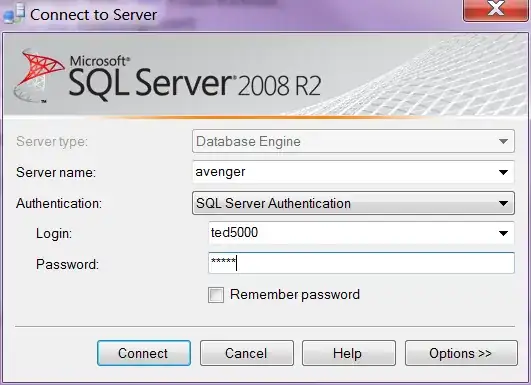
I can connect to SQL Server from SQL Server Management Studio:
I can connect to SQL Server with
telnet:C:\Users\Ian>telnet avenger 1433SQL Server is listening on port 1433:

Excel does connect, and receive response traffic from the SQL Server:

I can
pingthe server:C:\Users\Ian>ping avenger Pinging avenger.newland.com [192.168.1.244] with 32 bytes of data: Reply from 192.168.1.244: bytes=32 time=1ms TTL=128 Reply from 192.168.1.244: bytes=32 time<1ms TTL=128 Reply from 192.168.1.244: bytes=32 time<1ms TTL=128 Reply from 192.168.1.244: bytes=32 time<1ms TTL=128 Ping statistics for 192.168.1.244: Packets: Sent = 4, Received = 4, Lost = 0 (0% loss), Approximate round trip times in milli-seconds: Minimum = 0ms, Maximum = 1ms, Average = 0msTrying to connect by IP address (rather than by name) has no effect:

Windows Firewall is not running on the server: