5

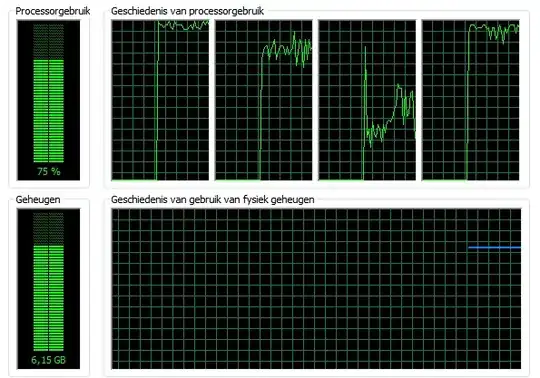
I'm trying to upload a collection of books to my Kindle using Calibre and its resource usage is through the roof:

enter image description here

While its usage of all my cores is impressive, this may be a bit extreme. Is there any way to limit the amount of RAM/CPU that Calibre can use?

Turning off several other programs (and no longer adding more books to the conversion queue) the memory usage drops slight. Still the three calibre-parallel.exe *32 processes each use up a complete core. As for the memory usage, for all four processes combined its totals in around 2 Gb, which I honestly think is a little massive.

Ivo Flipse
  • 24,696
  • 32
  • 103
  • 147

2 Answers2

3

In instead of throttling the amount of CPU cycles the program can use, it would make more sense to right-click the process in Task Manager and give it a Below Normal Priority.

That way the program will still be able to do what it needs to do when there is nothing else that needs to be done. I often do this when I am I have a background task running, like 3D rendering, as it allows me to use the computer as normal.

With Process Hacker you can also adjust its Page Priority, which I assume will change how the system allocates RAM to it.

paradroid
  • 22,761
  • 10
  • 76
  • 114
2

You can use BES (Battle Encoder Shirase) which is a small (lightweight) tool which limits the CPU usage for a specified process. I tried it on Windows 7 and it works.

Use this page to download: Version 1.4.3 – June 22, 2011

Link: How To Use

BES is a small tool which limits the CPU usage for a specified process: for instance, you can limit the CPU usage of a process which would use CPU 100%, down to 50% (or any percentage you like). With this, you can use other programs comfortably while doing something CPU-intensive in the background. By limiting the CPU load, you can also cool down your CPU immediately when it happens to get too hot. Of course the processing speed will slow down proportionally if you limit the CPU usage, but it should be much better than crashing because of heat or (in the worst scenario) having your computer broken with a burned CPU.

The result with this solution:

enter image description here

Ivo Flipse
  • 24,696
  • 32
  • 103
  • 147
Mehper C. Palavuzlar
  • 55,164
  • 49
  • 193
  • 250