Possible Duplicate:
Monitor all and any internet traffic from my home PC - what should I use?
I'm looking for a free software show download/upload speed on system tray. I found DU Meter, but it's not free. Anybody know ?
Possible Duplicate:
Monitor all and any internet traffic from my home PC - what should I use?
I'm looking for a free software show download/upload speed on system tray. I found DU Meter, but it's not free. Anybody know ?

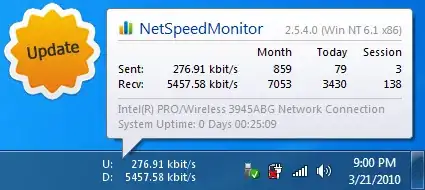
NetSpeedMonitor shows download/upload speed on system tray. It's free and lightweight.
NetSpeedMonitor is a lightweight Network Monitoring Toolbar for your Windows Taskbar designed to be used on computers that run Windows XP, Windows Server 2003, Windows Vista or Windows 7. With NetSpeedMonitor you can monitor the current speed (up- and downstream) of your Network Interfaces and the amount of data transferred.

I currently use Networx. It's stable and non-intrusive and can show traffic in several different ways, including a variably-transparent popup window, a taskbar graph and an animated system tray icon. I've also used NetMeter.

I haven't used it, but, I know people who have had good results with Free Meter


