5

I spend a lot of time using a PDF printer to "print" documents into PDF's... Is there a program that includes Explorer functionality to "Create PDF" via right click, context-menu?

This would, I hope, be the equivalent of "Open file" > "Print" > "Choose PDF Printer" (aka CutePDF) > Save as file with same name as DOC/XLS/...?

wonea
  • 1,817
  • 1
  • 23
  • 42
WernerCD
  • 4,313
  • 6
  • 32
  • 43

1 Answers1

5

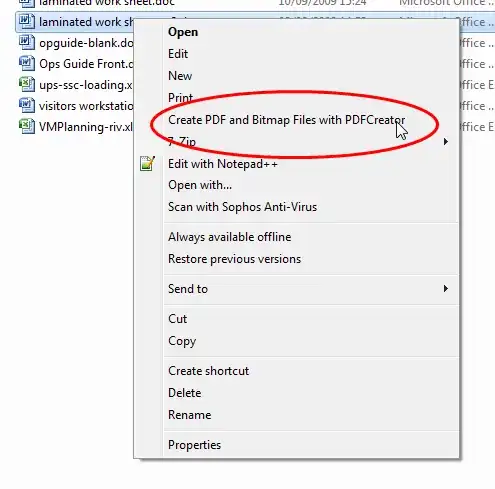
PDFCreator does this - it opens the relevant app, does the print to PDF and closes the app..

http://sourceforge.net/projects/pdfcreator/

enter image description here

Linker3000
  • 27,498
  • 3
  • 52
  • 73
  • Must be the only "PDF Printer" I haven't tried (CutePDF, PDF24, doPDF, PDF9895, etc). Trying it now. – WernerCD Nov 10 '11 at 16:52
  • 1
    The context menu works... the problem is it pops up with a "save as". Doesn't seem to have the option to "auto create new pdf, same directory, same name". This would be trading one set of clicks (open with word > print to "CutePDF" > save as) with another set of clicks (right click > save as > change to current directy). It does have an Auto Save feature that saves to a specific directory (not current directory). – WernerCD Nov 10 '11 at 17:00
  • 1
    http://www.pdfforge.org/content/auto-save-mode also "The last piece of the puzzle is setting up Auto-save in PDFCreator itself. Run "PDFCreator Settings" from the start menu and click the 'Auto-save' link on the left side of the window. " – Linker3000 Nov 10 '11 at 20:53