Resizing is one of the biggest problems I face with the default Windows command prompt. Are there are any free/open source alternatives available?
Asked
Active
Viewed 8,384 times
32

-
8You should consider learning Powershell and use Powershell ISE. ;-) – Tamara Wijsman Sep 04 '09 at 11:31
-
8More than a year later, answers seem to be supported by facts. Also this question did not solicity any unnecessary debate. I think that the moderator's decision to close this question is not supported by facts and should be revoked – Abhishek Anand Jan 05 '15 at 04:09
9 Answers
68
ConEmu is an opensource console emulator with tabs, which represents multiple consoles and simple GUI applications as one customizable GUI window.
Initially, the program was designed to work with Far Manager (my favorite shell replacement - file and archive management, command history and completion, powerful editor). But ConEmu can be used with any other console application or simple GUI tools (like PuTTY for example). ConEmu is a live project, open to suggestions.
A brief excerpt from the long list of options:
- Use any font installed in the system, or copied to a folder of the program (ttf, otf, fon, bdf)
- Run selected tabs as Administrator (Windows Vista or later) or as selected user
- Windows 7 Jump lists and Progress on taskbar
- Integration with DosBox (useful on 64-bit systems to run DOS applications)
- Smooth resize, maximized and full screen window modes
- Scrollbar initially hidden, may be revealed by mouseover or checkbox in settings
- Optional settings (e.g. palette) for selected applications
- User friendly text and block selection (from keyboard or mouse), copy, paste, text search in console
- ANSI X3.64 and Xterm 256 color
- In last alpha, build (120802), a split-screen feature was added (first try, may be buggy)
Far Manager users will acquire shell style drag-n-drop, thumbnails and tiles in panels, tabs for editors and viewers, true colors and font styles (italic/bold/underline).
(Sorry for the self-promotion, I'm the author of another free and open source Console Emulator, not mentioned here.)

Peter Mortensen
- 12,090
- 23
- 70
- 90

Maximus
- 20,637
- 16
- 91
- 116
-
2Thanks for sharing your work. Finally, I have a terminal in Windows that does not make me miss Ubuntu's terminal. – Abhishek Anand Jan 05 '15 at 03:47
-
-
2cmder add nothing to conemu except some configurations and because of that it is slower than conemu. I prefer conemu. – Badr Elmers Apr 10 '20 at 05:08
14
ColorConsole is my 'Windows “cmd” replacement' of choice (actually it's just a GUI wrapper around cmd.exe, not a replacement in the strict sense).
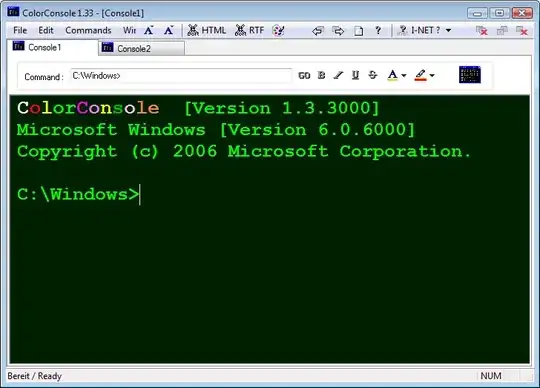
Features:
Favorites commands
Export to HTML and RTF
Copy, Paste, Cut, etc.
Change font style and color
Tabbed Interface with multi cmd.exe
Fast folder switch
And of course it is resizeable to your likings :)
ColorConsole is freeware and portable.
Peter Mortensen
- 12,090
- 23
- 70
- 90
-
gotte love these downvoters who don't have the courtesy (or is it guts?) to leave a comment. maybe they're just of severely limited intellectual prowess and thus not worth my while, whatever ... – Sep 04 '09 at 12:47
-
1seems a bit bloated to me. Export to HTML? and why the extra command toolbar when the *entire window* is a command shell? – hasen Sep 08 '09 at 13:02
-
1i wouldn't consider some 190 kilobytes of code a bloated piece of software. and why not export to HTML/RTF? it's perfect if you need to post/print/keep records of certain commands/results (e.g. netstat, ping, ipconfig /all, to name but a few), unless you prefer the good old screenshot ... but then, everyone to their own. :) – Sep 08 '09 at 14:25
-
1+1, Molly. Because It's free, because it adds lots of features, because you answered the question like everyone else and because downvoters can't win! – A Dwarf Sep 17 '09 at 00:26
-
2
-
I can't use **ctrl + c** to terminate a program. Some heavy output program (`tree` in a directory which have many files/directories) runs very slow – LiuYan 刘研 Aug 03 '12 at 09:00
-

12
You don't need a replacement because you can do what the you want with the Windows "cmd" window using the built in options. If you right click on the title bar you can get to a properties dialog where you can control the fonts, window size and colours etc.
And as Alex points out you can apply the settings to all future command windows, not just the current window, so they'll all be the size you want.

ChrisF
- 41,278
- 17
- 101
- 154
-
5And when you've done that, apply the settings to all windows, not just the current window. That way, the settings become permanent. – alex Sep 04 '09 at 10:34
8
The intuitive "mode" command lets you change the size:
mode 250,80
just about fills my 1680x1050 screen. You could have a batch file that says
cmd.exe /k "mode 250,80"
and launch from there.

Phoshi
- 23,233
- 2
- 61
- 81
-
4
-
-
1if you do a cmd /? it'll give you a lovely array of fancy things it can do :) – Phoshi Sep 04 '09 at 13:34
-
1i wonder why only cmd.exe is not resizable to fullscreen on Windows Vista!! – Lazer Sep 16 '09 at 22:37
-
5
It is not cmd you want to replace, it is the console itself. cmd.exe is like /bin/bash - reads commands, prints output. Windows Console is like xterm - displays everything inside a window. These two are independent of each other.
I like "console".

u1686_grawity
- 426,297
- 64
- 894
- 966
5
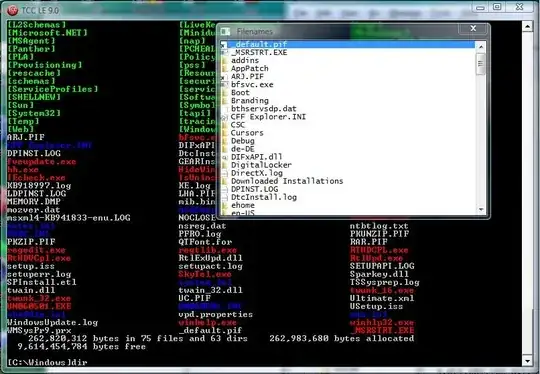
Been using 4NT and Take Command from jpsoftware.com for years and years, that is, when I'm on Windows.
Otherwise, it is "the one true shell" - tcsh!
2

Jim Balter
- 139
- 1
- 10

paradroid
- 22,761
- 10
- 76
- 114
-
@lambdor: I reverted your edit, as I don't think `TCC/LE` is a wrapper for `CMD`. It is an independent replacement shell as far as I can see. `Console2` is a wrapper. – paradroid Sep 05 '11 at 11:33
-
2This is the only real answer on the page. The others are replacements for the console, this is a replacement for cmd – gman Apr 13 '20 at 07:36
-
@gman You're mistaken. The OP wants to resize the window, so the question is about a replacement for the console, not the command interpreter. This answer addresses both, since it mentions Console2, but there are other answers that do the same. – Jim Balter May 16 '20 at 23:00
-
2
I used console 2, powercmd and colorconsole, but neither of them can run most of the external commands, like connecting to another computer using telnet or searching within output by piping to find and sadly, as far as I know there is no way to fullscreen console applications in 64-bit editions of Windows, even if you disable your graphic card driver.
Peter Mortensen
- 12,090
- 23
- 70
- 90

adventurer
- 79
- 2