21

For some strange reason, my computer suddenly doesn't show certain unicode characters anymore! I have no idea what happened.

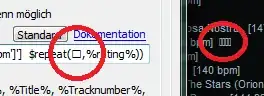
Affected applications include Windows Explorer (should be Japanese characters), Google Chrome (should be a heart), and Winamp (should be stars):

unicode unicode enter image description here

Russian, German etc. characters are displayed normally. Chrome also displays Japanese script on websites, but not in the GUI. How can I fix it?

TL;DR: A workaround is to put a shortcut with a Unicode name on the desktop so that explorer.exe is the first process to display a Unicode string after booting.


Update: I have tried to use System Restore to fix it. I needed to go back in time quite a while because the most recent restore points didn't solve it so I used one from the middle of November. After that restore, Unicode symbols were displayed again. Then I updated my system with Windows Update again because those were removed during the restore. After that, the error occurred again! I then did a restore to a point before my new updates, but the error persists, and the old restore point (which I used before) is gone and there are currently no other snapshots of the system. Any suggestions on what to do now?

Update 2: I could find a workaround:

Control PanelRegion and LanguageAdministration → Change Language for Unicode-incompatible programs to Japanese (Japan).

All mentioned programs display their symbols correctly again. However, I don't consider this a fix because these programs are not usually Unicode-incompatible, and it also leads to some (non-serious) artifacts in some programs. I still welcome an answer that tells me what went wrong here and how to fix the issue.

Update 3: I think I have isolated the particular Windows Update which causes the error. It is Slow performance in applications that use the DirectWrite API on a computer that is running Windows 7 or Windows Server 2008 R2. I have installed all other updates except this one, and the error did not occur again.

Update 4: The true origin of this problem was Chrome, see accepted answer. Workaround: put shortcut with Unicode name on desktop so that explorer.exe is the first process to display a Unicode string after booting.

Felix Dombek
  • 2,003
  • 9
  • 28
  • 49
  • 1
    Have you attempted a [System Restore](http://windows.microsoft.com/en-CA/windows7/products/features/system-restore) to a point when it was working? – Ƭᴇcʜιᴇ007 Dec 24 '11 at 19:53
  • I did, see my update. – Felix Dombek Dec 25 '11 at 18:29
  • 2
    Try reinstalling font. Also what is your default unicode language? – Little Helper Dec 25 '11 at 18:50
  • How do I find that out? However, as you can see in the screenshots, the error occurs with different fonts so I believe it's not a problem with the font. – Felix Dombek Dec 25 '11 at 19:37
  • 1
    This worked for me, and, in fact, I could then change the "Language for Unicode-incompatible programs" back to "English (United States)" which is what is was before, and the fix continued to work. – Brian Rothstein Mar 08 '12 at 20:10
  • What’s really interesting about this is that it does not happen with XP. Obviously Microsoft did something with Unicode handling in Windwos 7 (and probably Vista as well) that has a serious vulnerability which Chrome (hopefully by accident) exploits and breaks Windows. – Synetech Sep 14 '13 at 14:36

2 Answers2

22

Found this interesting tidbit. It seems that this may have something to do with which application first tries to display a unicode character.

Long story short, I found this bug for Chromium and a comment in the discussion suggests that this is the case and provides a workaround of putting a unicode-named file on the Windows desktop to force Windows to be the first application to render a unicode character:

"Therefore, as a workaround for this issue, put a file named 火.txt or similar on your Windows Desktop. I suppose this causes Windows Explorer to be the first program to render a [unicode] character."

I tried this approach and sure enough, it worked for me -- without having to change the Language for Unicode incompatible programs."

kiddailey
  • 336
  • 2
  • 3
  • After reading through it all again, this might very well be the correct cause for my issue. Thanks for posting it here. +1. – Felix Dombek Aug 26 '12 at 15:47
  • Seems as if it really was this. Accepted. – Felix Dombek Sep 03 '12 at 04:34
  • This a) is additionally necessary / useful on Windows 8. b) Isn't 100% effective. Maybe another application that starts with Windows sometimes beats Explorer to the desktop? Can't think of any likely candidates, especially not with the shell:startup lag in Win8. – FauxFaux May 07 '13 at 07:17
  • 2
    I just tried it and it worked a treat. Chrome is seriously broken if it prevents the entirety of Windows and all applications to fail to show Unicode correctly. ಠ_ಠ – Synetech May 25 '13 at 00:28
  • @Synetech I think this is a bug in Windows. The API should be protected against accidental misuse. – Felix Dombek Jun 05 '13 at 15:05
  • 2
    @FelixDombek, that makes sense and is what I assumed, but even if that’s the case, it is still Chrome that is misusing/exploiting/exposing/triggering a bug in Windows since other browsers don’t cause it to happen. I suppose that can be either a good or bad thing depending on your viewpoint. – Synetech Jun 06 '13 at 14:09
3
  1. Change your "Language for Unicode incompatible programs" to Japanese (any other language will do)
  2. Change this back to the original value.

It fixed the issue I had with the display of Chinese characters after a Windows update.

Brian Rothstein left a comment with such an answer.

Gabriel
  • 131
  • 3
  • Didn't work for me when switching back. However, I think I know now which Windows Update is responsible. I'll post more info when I'm sure. – Felix Dombek Apr 12 '12 at 16:53
  • Any update Felix? I recently ran Windows update and am now having the same problem. And like you, changing the "Language for Unicode incompatible programs" doesn't stick when changing it back. – kiddailey Jun 10 '12 at 05:59
  • @kiddailey: The fault lies with either http://support.microsoft.com/kb/2545698 or http://support.microsoft.com/kb/2505438, I'm quite sure. Not installing those two updates has stopped the issue from recurring so far. – Felix Dombek Jun 21 '12 at 20:12