79

I accidentally left a USB flash drive in my clothes, which was then washed with my laundry. This was a colored load, hot water.

The drive survived just fine and was very clean. All data was still there, and I see no physical damage.

Am I risking any long-term data loss/drive damage due to this washing affair, or is there no additional risk now that I see the drive has not suffered any initial damage?

Gaff
  • 18,569
  • 15
  • 57
  • 68
  • 5
    I've done this so many times and every time the data was gone :( – surfasb Dec 28 '11 at 22:14
  • 72
    *The Drive survived just fine, and was very clean* made me laugh. – Daniel Beck Dec 28 '11 at 22:21
  • 8
    @surfasb: That's too bad - I've put drives through the wash so many times I've lost count, and have yet to ever lose data from it. – BlueRaja - Danny Pflughoeft Dec 29 '11 at 00:15
  • My buddy put his USB drive through the washer once, and a second time through both the washer and dryer. I haven't asked him recently about whether it is still working but the data was all there after both times and for months after (at least--like I said, I haven't asked him recently) it was fine. – Kazark Dec 29 '11 at 03:59
  • 9
    I have done this at least 3-5 times, each time going through washer and dryer. No data loss or noticeable failure. I'm sure premature corrosion may occur, but for now, things are still good. As with all data, backup. . . backup. . . BACKUP! – Mike Munroe Dec 29 '11 at 05:02
  • 18
    Out of curiosity: What temperature do you need to kill all viruses? Happy new year! – Krumelur Dec 29 '11 at 09:36
  • 3
    OMG...would you mind sharing pen drive brand you guys use ? My Transcent stopped working after a single wash... :O LOL – Sangram Dec 29 '11 at 11:21
  • I washed a Kingstone pendrive 4 years ago. Today It's working without issues. Of course... this is only one case, and there's a huge risk of loss all the data. Make a backup now, before some parts of the device starts getting corroed. – Jonathan Dec 29 '11 at 11:15
  • I experienced a Kingstone pendrive surviving a Finnish winter under a thick layer of snow, with no loss or damage. – Niels Dec 29 '11 at 14:05
  • @Niels: Maybe it was the same model! :D This is my pendrive model -> http://asica1.com/images/8369277_ra.jpg – Jonathan Dec 29 '11 at 17:11
  • I'd probably re-wash it in pure ethanol or isopropyl alcohol to dilute the remaining water, then wait for it to evaporate. – avakar Dec 30 '11 at 10:49
  • @Sangram: this was a Kingston Data Traveler drive... looks like Kingston is the way to go if you are prone to washing them... –  Dec 30 '11 at 17:12
  • 1
    "Beachcomber finds camera memory card washed up on shore after four years at sea... and now wants to know who's in the photos" http://www.dailymail.co.uk/news/article-2006083/Man-finds-camera-lost-sea-4-years-washed-California-shore.html – Aki Jan 03 '12 at 18:21
  • I had on in the pocket of my jeans go through the wash and dryer, twice. A year later, it's still working without a problem. – Jeff Reddy Jan 22 '16 at 17:54

3 Answers3

57

Get rid of the water up as soon as possible, prevent metal corrosion.

The life span has likely been diminished. There are metal parts that if got wet may corrode over time, unless you are absolutely sure that you got rid of all the water that got into the USB drive.

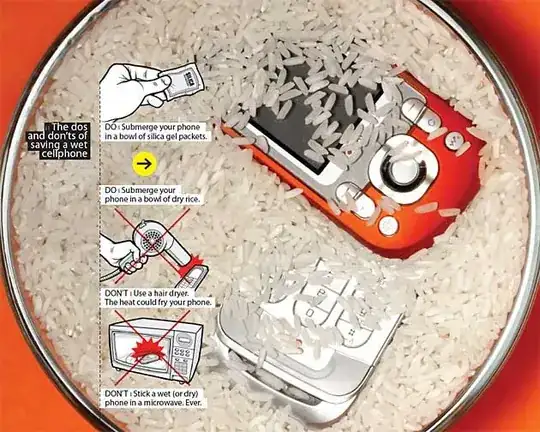
Putting it in a bowl of uncooked rice overnight is often said to help. It is worth to take the increased risk as the cost of a new USB drive might not be worth it. In the comments iglvzx explains that this is dependent on where you live.

Absorbation of the water is important, heat must be avoided!

Jeff Atwood ♦ shares us two useful articles:

  • Digital Inspiration - How to Dry your Wet Cell Phone

    First turn off the wet phone and then open the back lid to remove the battery and, if present, the SIM card. Use a towel or cotton tissues to dry the external (visible) portions of the phone as much as possible.

    Next, the most important part, we need a way to absorb the water that may have entered inside the phone body. One popular option here s that you put the phone in a bowl of uncooked rice and seal the bowl with a plastic sheet. Rice being a natural desiccant should absorb the moisture out of your phone over the next 2-3 days and if you are lucky enough, the phone should start ringing again.

    There are however some other alternatives to rice that could be way more efficient.

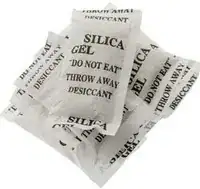
    Put the phone inside a zip-lock plastic bag with silica gel packets, leave for 2-3 days and the packets will absorb all the moisture from the phone’s interiors. Silica gel is a better desiccant than rice and can be easily obtained from your local hardware / craft stores.

  • Popular Mechanics - How to Save Your Wet Cellphone: Tech Clinic

    The first step: Immediately cut the power by removing the battery. I know it's tempting, but resist the urge to power up your phone to see if it works--just turning it on can short out the circuits. If you have a GSM phone (the type used by AT&T and T-Mobile), you'll want to remove the SIM card as well. Even if your phone turns out to be beyond repair, the SIM should retain a lot of its onboard information, such as the contacts in your phone book.

    With the battery safely set aside, you now have one goal--dry your phone, and dry it fast. If you let the moisture evaporate naturally, the chance of corrosion damaging the phone's innards increases. Instead, blow or suck the water out. But don't use a hair dryer--its heat can fry your phone's insides. Instead, opt for a can of compressed air, an air compressor set to a low psi or a vacuum cleaner (a wet/dry Shop-Vac would be perfect). The idea is to use air to push or pull moisture out through the same channels it entered.

    Finally, use a desiccant to wick away any leftover moisture. The most convenient choice is uncooked rice. Just leave the phone (and its disconnected battery) submerged in a bowl of grains overnight. If you're worried about rice dust getting inside your phone, you can instead use the packets of silica gel that often come stuffed in the pockets of new clothes. But acting fast is far more important than avoiding a little dust, so don't waste time shopping if you don't already have a drawer full of silica gel.

    The most important thing to remember is to avoid heat. That means no hair dryers, ovens, microwaves or extended periods in direct sunlight. While heat will certainly evaporate the moisture, it could also warp components and melt adhesives. Those fragile glues are also why you'll want to avoid dunking the phone in rubbing alcohol (an oft­prescribed tip on the Web). Alcohol is a solvent and can dissolve the internal adhesives. (If you drop your phone in the toilet, it's okay to wipe the outside with alcohol to disinfect it.)

    One final, perhaps surprising, note: If your phone gets soaked in salt water, you should probably flush the whole thing in fresh water before it dries. When salt water evaporates, it leaves crystals that can damage a phone's fragile components. Just be sure to remove the battery before flooding the device.

Paul
  • 59,223
  • 18
  • 147
  • 168
  • Definitely, considering that you can now buy a 4 GB thumb drive for as little as $2.00 in some places. – iglvzx Dec 28 '11 at 22:12
  • 107
    *Uncooked* rice. – Keith Thompson Dec 28 '11 at 22:15
  • 5
    some info on using uncooked rice as a dessicant: http://www.labnol.org/gadgets/dry-wet-phone/20149/ and http://www.popularmechanics.com/technology/how-to/tips/4269047 – Jeff Atwood Dec 29 '11 at 02:49
  • 6
    @KeithThompson I cook the drive *with* the rice, right? – Ben Brocka Dec 29 '11 at 19:34
  • 4
    If only they wouldn't put *throw away* on those silica gel packages I'd still have some. – Daniel Beck Dec 30 '11 at 11:12
  • [Thirsty Bag](http://www.ifixit.com/Tools/Thirsty-Bag/IF145-163) WILL remove all the water overnight, at least it has the two times my iphone has met beer. – opsin Jan 13 '12 at 03:58
  • 1
    I was about to ask *who the hell would think of putting a phone in a microwave*, when I remembered that my laptop's manual came with the following advice: [*"Do not put in pressure cooker."*](http://i.imgur.com/XVZ0C.jpg) – Polynomial Aug 06 '12 at 12:58
  • Make sure to use regular rice, not instant...Minute Rice is less than ideal for absorbing moisture. If the device doesn't work after drying out, all hope is not necessarily lost. I've brought back more than a few cellphones from the dead that were thought to be gone forever because of water-damage. Find someone who works on cell phones and have them remove the motherboard (if a cellphone), then use (preferably high-grade) rubbing alcohol and a cotton swab to thoroughly clean it. Air dry. Before cleaning, if you notice scorch marks (indicative of fried componets), then it's likely unsalvagable. – akTed Apr 13 '13 at 21:41
31

Back up as soon as possible, your data is in danger.

The main danger is corrosion. Even if you dried the drive properly, some water may still remain, trapped under SMD components, etc. This will cause the device to fail, eventually.

So, in my opinion, best course of action is this:

  1. Back up your data on that drive.

  2. Disassemble the drive and wash the PCB with isopropyl alcohol. This will drive most of the trapped water out.

  3. Dry it properly (Week or so in a dry place will be enough).

  4. Never use it for anything you cannot lose.

haimg
  • 22,193
  • 16
  • 79
  • 113
  • Backing it up is step 0, right? And step 3 is good advice for *any* drive. – Keith Thompson Dec 28 '11 at 22:16
  • Remaining water? Ha, just put it in a [speedvac](http://www.thermoscientific.com/ecomm/servlet/productsdetail_11152_L10650_81872_12811388_-1) or [bake it out](http://www.microcure.com/pdf/RAPID%20%20EFFECTIVE%20BAKE%20OUT%20APPROACH%20FOR%20MSDs.pdf) at 125 °C for about 168 hours (as it's packaged, so will be more difficult). – Nick T Dec 28 '11 at 22:28
  • @KeithThompson: Yes of course, I was sloppy... Wanted to use "step 0" but SU's post formatting engine won't let me. – haimg Dec 28 '11 at 22:29
  • 10
    So step **4** is good advice for any drive. – Keith Thompson Dec 28 '11 at 22:44
  • 4
    @KeithThompson Step 4 is good advice for almost anything in life. :) – Ƭᴇcʜιᴇ007 Dec 29 '11 at 00:04
5

If you dried it well (hair dryer for example or some time in a very dry ambient) and it is working, I would use it as a perfectly normal USB Flash drive (so very insecure) and that means do not store any not backed-up data you can't lose on it for long time... Thumb drives are subject to a lot of possible problems... washing is a new one (for you and for me but others seems to have this experience already)... but losing it, being stolen, falling (in places you can't take it back sometimes), being crushed are some others and a failure due to a prior washing is just one more possibility.

The green process for circuit board manufacturing often includes running the boards through essentially an industrial dishwasher to remove unused solder flux. If the device was rinsed well and no soap residue and dried well, I would not expect any issues. Note, it is different for electronics with a battery. devices with power applied while wet will experience electrolysis and the result there will not be good.

akTed
  • 147
  • 7
laurent
  • 4,402
  • 22
  • 23