1

I am running Windows 7 Ultimate and I have mapped a network share to a drive letter. The first time that I open the share, I am prompted for login credentials as expected. I do not select the "Remember my credentials" checkbox and can login successfully, but every time that I re-open the share during the session, I do not need to re-enter my credentials.

Is there any way to force a credential check every time that I re-open the share? I do not want to perform a reboot every time that I want to "re-lock" the share.

Logan VanCuren
  • 111
  • 1
  • 1
  • 3
  • I also tried right clicking on the mounted share after authenticating and select disconnect. The icon changes to show a big red X but then when I try to reconnect to the share, I get an error message that tells me `X:\ refers to a location that is unavailable...` – Logan VanCuren Jan 11 '12 at 02:58

2 Answers2

2

I don't think that there is necessarily a way to do this automatically. That may yield unexpected results each time you browse a folder or try to copy one (or multiple) files. However, you can look to see which network shares you have accessed and remove if needed.

I can see this valuable if you need to move away from your computer and do not wish to reboot to clear the sessions and/or if someone may hop onto your computer and you do not want them getting fancy with browsing your network and seeing a share with credentials already entered.

You can open a command prompt: Start > Run > CMD

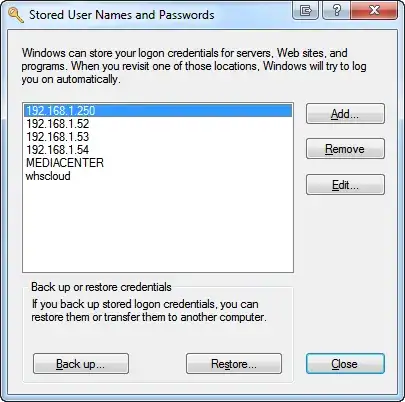
Type rundll32.exe keymgr.dll, KRShowKeyMgr

From here you can remove authenticated network shares so that the next time you will have to type in the credentials again. I know that this isn't exactly what you're looking for, but may be an alternative.

enter image description here

kobaltz
  • 14,784
  • 3
  • 36
  • 57
  • 1
    Because I am not clicking on the checkbox to save the credentials, the server does not show up in the Stored User Names and Passwords list. – Logan VanCuren Jan 10 '12 at 04:02
  • This just saved approximately two days of my nerves with clean Windows 7 installation not asking me username/password when trying to connect to already shared (and before re-install accessible) stuff on different computer in the same workgroup. Thank you, good sir. – Smuuf Mar 06 '13 at 02:10
1

Fire up a command prompt and do a net use. You will probably see a connection open the share and system you are connected to. Run net use \\server\share /delete to disconnect. You might also see a connection like \\server\ipc$ connected. You will need to close that as well. Once you completely close your connections, you should be re-prompted unless you saved your password.

You could put this in a batch file as well.

Another thing you could do is simply logout/login again. It should be faster then a full reboot.

Zoredache
  • 19,828
  • 8
  • 50
  • 72
  • When I attempt to run the command `net use \\server\share /delete` (substituting my information) I receive the message `The network connection could not be found. More help is available by typing NET HELPMSG 2250.` and the network share is not removed from the `net use` list. – Logan VanCuren Jan 11 '12 at 02:53