2

Good afternoon all,

I have a problem whereby everytime I hibernate my laptop (Acer Aspire 4937G) and put it in my laptop bag, when I take out my laptop it is really hot (about 70 degrees and I could hear it spinning).

From what I understand, hibernate totally turns off the power, so the laptop shouldn't have been hot,

I was wondering what makes the laptop turn on by itself? What could have caused the problem?

I do have a problem with my battery but that shouldn't make the laptop capable of turning on by itself could it?
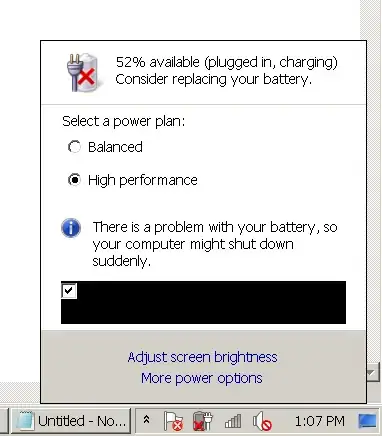
enter image description here

Pacerier
  • 26,733
  • 82
  • 197
  • 273
  • You could have a faulty power button; it could be getting triggered somehow. – iglvzx Feb 01 '12 at 06:16
  • @iglvzx Hmm, that's not very possible I think, because the laptop is closed while put in the laptop bag. – Pacerier Feb 01 '12 at 07:14
  • The indication that "it is on-ed" is **that it is on**. You've omitted the fairly important datum of _whether your laptop actually turned out to be on_ when you took it out of the bag. You've also omitted information about the colours and states of the various power lights on the machine. – JdeBP Feb 01 '12 at 11:46
  • @JdeBP It is burning hot, like 70 degrees.. and I could hear it spinning so of course it was running while in the bag. – Pacerier Feb 01 '12 at 12:34
  • 3
    There's no "of course" about it to the people who are reading a question. You should write important and relevant information like that in the question. Don't rely upon the world telepathically obtaining it from inside your head. – JdeBP Feb 01 '12 at 13:47
  • @JdeBP Thanks for the info, added to the question =) – Pacerier Feb 01 '12 at 14:35
  • Stupid question, but you are hibernating your laptop arnt you and not putting it into standby ?. When it goes into hibernate do all the lights and everything go off on your laptop, so it looks like it is turned off ?. – Iain Simpson Feb 01 '12 at 14:42
  • I had this problem a few years ago with Kerio Personal Firewall preventing hibernation, so the laptop continued running. Check your background application, quit them one by one and see whether you can actually hibernate. – Daniel Beck Feb 01 '12 at 14:46
  • @IainSimpson Yes there's no more lights. It's cold as the room. But it turned itself on while in the bag and when I take it out it's hot like pancakes. What may be the cause? – Pacerier Feb 01 '12 at 14:49
  • 1
    Certain device drivers and other software can prevent hibernation. Sustained high temperatures in an enclosed space is very bad for your battery and the laptop in general so this is something you will want to get resolved as soon as possible. If you can't figure it out you might have to resort to doing a full shutdown before putting it in the laptop bag. – Shane Wealti Feb 01 '12 at 15:36

1 Answers1

2

If you're positive that the laptop has actually hibernated in the first place (easy to verify by opening the laptop up and seeing if Windows resumes from Hibernation or just comes back to life), then there's something waking the laptop up. Yes, it's possible for the RTC Alarm to wake the system up even from Suspend or Hibernate.

My first guess is to think that it's a Scheduled Task of some kind triggering the laptop to wake up. See what's running there and configured to wake the system if needed.

Also, when you hibernate the system, is it plugged in or are you already on battery?

What's the system doing when you open it up? What's running? No laptop built in the last several years gets very hot while idling unless you put it in an oven, so it's doing something. See if you can figure out what it is, or come up with a low impact way to log it.

afrazier
  • 22,987
  • 3
  • 60
  • 88
  • It is plugged in when I initiate the command to hibernate the computer. When I open up the laptop, it's at the logon-screen, so after inputting my password its just as it is (in the state where I have hibernated it). A couple of chrome tabs are minimized. – Pacerier Feb 01 '12 at 16:39
  • Since it's plugged in when you hibernate it, it's possible that the Task Scheduler is setting the RTC Alarm before powering off. Try unplugging first, making sure Windows knows you're on battery before hibernating. It's not likely to work, but it's worth a shot. – afrazier Feb 01 '12 at 19:24
  • it's really weird, sometimes its OK but other times its not. – Pacerier Feb 20 '12 at 17:11
  • 1
    I just stumbled upon the `powercfg.exe -lastwake` command that you might be able to take use of. ([TechNet Documentation Link](http://technet.microsoft.com/en-us/library/cc748940%28v=ws.10%29.aspx)) – afrazier Feb 20 '12 at 17:31
  • [How do I prevent Windows 7 laptop from waking up automatically?](http://superuser.com/questions/304935/how-do-i-prevent-windows-7-laptop-from-waking-up-automatically) – Khaleel Sep 27 '12 at 06:25