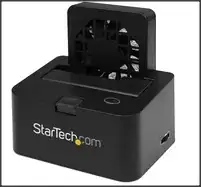
I have an eSATA docking station like the one in this picture:
Every now and then, when I try to eject my drive, Windows complains with the following message:
Things I tried:
I followed the instructions in this thread: Can Windows tell me what is using my USB drive? and I have Sysinternals Process Explorer installed, but when I search for the drive letter (
F:\in my case) nothing pops up.Following Oliver Salzburg's suggestion I run
mountvoloncmdand got the unique drive identifier that widnows reports is associated withF:\. I then searched for any handles referring to this identifier in Sysinternals Process Explorer but again nothing popped up.Following Alan's suggestion I tried Sysinternals handle, ahd this is what I got:
Handle v3.46 Copyright (C) 1997-2011 Mark Russinovich Sysinternals - www.sysinternals.com
svchost.exe pid: 1020 type: File 594: F:
svchost.exe pid: 1020 type: File 5C4: F:\$Extend\$ObjId
svchost.exe pid: 1020 type: File 604: F:\System Volume Information\tracking.log
I can see that svchost is blocking my process, which technically answers my question. Now, would anybody mind helping me figure out how, knowing this, I can unblock the device?


