5

The zooming features in both Internet Explorer 8 and Firefox really bother me. I use Ctrl + (TrackPad Click) to open new tabs and often my finger will graze the track pad which activates the zoom feature (Ctrl + mouse wheel basically). Then normally the tab, which was just opened, will be 1000% or 10%.

How can I disable this feature, I will never need it?

Peter Mortensen
  • 12,090
  • 23
  • 70
  • 90
Bob
  • 906
  • 5
  • 17
  • 22
  • It sort of worries me that my first thought was: "Use autohotkey to disable control and mousewheel if firefox is active", as the below about:config hacks are much better for it. – Phoshi Sep 12 '09 at 15:23
  • I actually have that set to alt-tab instead. Nice actually... – RCIX Sep 12 '09 at 15:40

2 Answers2

5

Firefox

Enter about:config in the address bar. Now, look for zoom.maxPercent and zoom.minPercent and fix their values to 100.


Internet Explorer

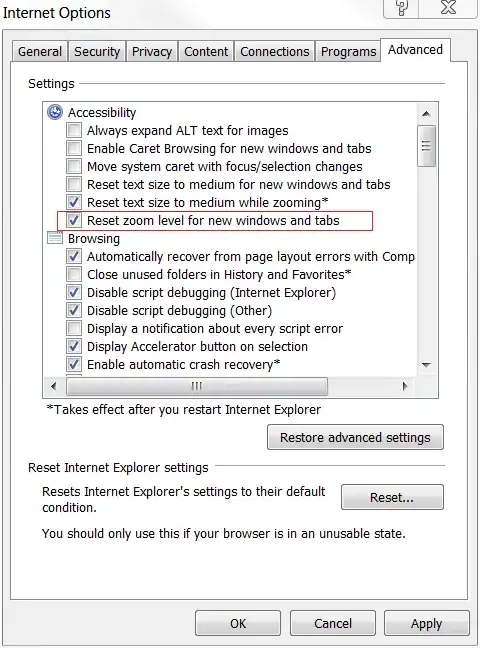
For Internet Explorer, I think this is what you meant:

Go to menu Tools >> Internet Options >> Advanced and check that box.

Alt text

Peter Mortensen
  • 12,090
  • 23
  • 70
  • 90
  • For Firefox, a restart of the application is required before zoom.maxPercent and zoom.minPercent takes effect (at least for some versions of Firefox). Otherwise it can become very confusing changing the values. – Peter Mortensen Feb 15 '12 at 09:51
4

In Firefox, if you still want the option of zooming with ctrl-- and ctrl-=, you can go to about:config and set mousewheel.withcontrolkey.action to 0. This makes it so scrolling with the control key down does the same as scrolling without the control key.

I couldn't figure out how to disable the ctrl-scroll binding entirely.

regan
  • 712
  • 4
  • 8