2

In a text document, when you paste something from the clipboard, the new text is inserted into the document.

In a table document, when you paste, the existing cells are overwritten.

How can I get the behavior of text documents in Calc?

All my tables have four columns; all I want is that Calc makes room for N rows (when I have N rows copied) and then pastes.

Aaron Digulla
  • 6,925
  • 8
  • 45
  • 66

1 Answers1

1

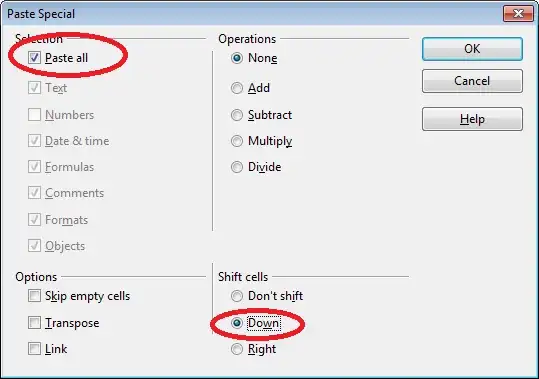
You can achieve this using "Paste Special" (with CTRL+SHIFT+V or Menu "Edit" -> "Paste Special"), as Justin wrote in his comment. To insert the new rows above the selected row while retaining the style of the rows in the clipboard, make sure that the following paste options are selected:

  • Selection: "Paste all" (including Formats)
  • Shift cells: "Down" (use "Right" when pasting columns; leave the default "Don't shift" to overwrite existing, selected cells)

paste special with shifting existing cells

Using these settings, the inserted rows will keep their styles (both directly applied styles and cell styles).

tohuwawohu
  • 10,303
  • 1
  • 35
  • 63