On a MacBook Air running OS X Lion, I have a dock bar at the bottom of the built in screen, how can I move this to my external screen? I've already got the menu bar moved, but the screen system preference control does not appear to also control the dock location.
Asked
Active
Viewed 1.7k times

3 Answers
12
The Dock is on the bottom screen if the arrangement makes them overlap vertically.
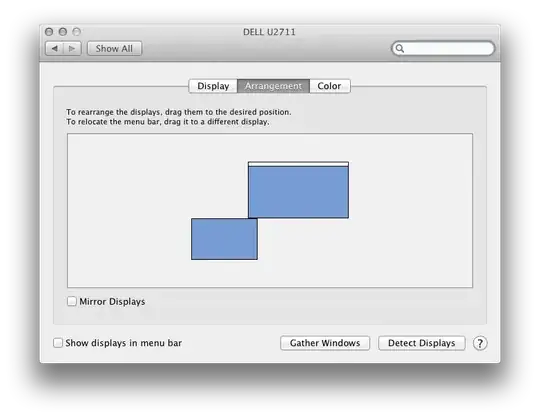
Otherwise, it's on the screen with the menu bar, e.g. in the following two arrangements:


AFAICT, the reason is that the Dock requires you to move the pointer to the screen edge if it's hiding, and that only works for the bottom-most screen.

Daniel Beck
- 109,300
- 14
- 287
- 334
-
I have my monitors arranged in the system how I physically have them, and I can't get the Dock on the monitor that I use as my main because of this behavior D: – starscream_disco_party Jul 20 '16 at 12:42
-
@JustLikeThat You could move the Dock to the left or right edge of the screen if you need it on the "top" screen. – Daniel Beck Jul 20 '16 at 14:10
3
To move the dock to a different monitor on a mac we can place the cursor on that monitor ( ensure there is a click on the monitor so the focus is on that monitor) &
Simply move the cursor to the bottom of that monitor & hold it for 2 or 3 seconds and the dock will move.
This is slightly different from a pc where we can click & drag the task bar from monitor to monitor.
Hope this helps.

Catto
- 186
- 1
- 10
-
-
Hmm I wonder why; the mac I use has El Capitan running on it and it works; I'll have to look more maybe it's an additional setting. Thanks for the feedback – Catto Feb 25 '16 at 19:07
-
Maybe I misunderstood, I'm holding the mouse at the desired destination location, perhaps you meant at the existing location? – WilliamKF Feb 27 '16 at 17:46
-
Thank you! I did this on accident and it took finding this post to even figure out what had happened. Do you by any chance know how to disable this feature? – rurp Feb 23 '18 at 17:06
2
You can move the dock with the menubar from the top of the main monitor, if you don't mind that.
At the Display Panel, you can drag the menubar and drop it onto the secondary monitor, and you can see the dock has also been moved to the same screen.
Just be careful that you click on the menubar not the whole screen!
Similar to this tutorial: http://mcreative.tistory.com/148 (in Korean)

jonsca
- 4,077
- 15
- 35
- 47

JohnJHPark
- 21
- 1
-
2Only if the screens don't overlap vertically. If they do, the Dock is always on the bottom screen. – Daniel Beck Oct 01 '12 at 10:05
-
@DanielBeck You are right. Alignment of two screens is another consideration in order to locate dock at proper place. – JohnJHPark Oct 01 '12 at 11:10