21

What parameter can help me to display the full command using top -c?

For example, I have one of the oupput from top -c

  5073 mysql     20   0  298m  12m 4668 S    0  0.0  29:27.46 /usr/sbin/mysqld --basedir=/usr --datadir=/var/lib/mysql --user=mysql --log-error=/var/log/mysql/mysqld.log --pid-file=/var/run/mysql/mysqld.pid -

There are more parameters after --pid-file==/var/run/mysql/mysqld.pid, but they are chopped off as the screen size. How can I make them visible?

user200340
  • 313
  • 1
  • 2
  • 4

5 Answers5

11

top per se doesn't support wrapping, if i am correct. One way is you can increase your terminal width as follows.

export COLUMNS=_NO_YOU_DESIRE_
top

** then set update interval with 's _REFRESH_INTERVAL_'
** turn on command line display with 'c'
  • With zsh at least, this has undesirable side effects like shifting the right hand side prompt, and the initial position of the cursor. – Sridhar Sarnobat Jun 18 '14 at 18:12
6

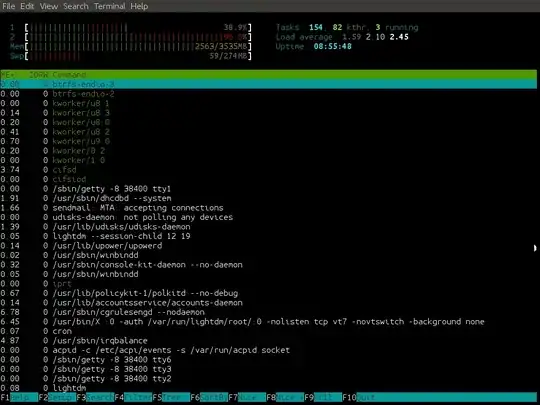
htop shows the full command. You can scroll to the right to see it all.

htop screenshot

http://hisham.hm/htop/

You can also rearrange, add and remove the columns to just show the information you are interested in. Press h inside top for details (or man htop in the terminal).

Ken Sharp
  • 184
  • 2
  • 8
1

What helped was using the -O option to move the command to the leftmost column and then -f to remove most of the other items. I was interested to see only the full command which was being run.

Jawa
  • 3,619
  • 13
  • 31
  • 36
Taher
  • 11
  • 1
0

top with cron.

crontab -l
*/5 * * * * ( echo; date -Is; top -b -n1 -c -w | head -n 12 ) >> ~/cpu_usage.log

-c display full command

-w prevent top for limiting line len to 80 char

-b batch mode

-n1 1 iteration

Pieter
  • 148
  • 4
0

You could use something like ps -eF > ps_out to get a snapshot of your current processes, with all the command line arguments. Or use htop which supports scrolling.

hth

ortang
  • 394
  • 4
  • 11