5

At my office, we do use telephone which is controlled by PABX system. I want to provide LAN and telephone connection to a user through a single CAT-6 UTP cable. I know that wires 1, 2, 3 & 6 of CAT-6 UTP are used for data transfer & receive. Wires 4, 5, 7 & 8 are not needed.

Now, if I connect wires 1, 2, 3 & 6 in RJ-45 for LAN and wires 4, 5 or wires 7, 8 for telephone, will that work?

Please note, wires 4, 5, 7, 8 would be unavailable in RJ-45 connector.

MaQleod
  • 13,149
  • 4
  • 40
  • 61
pervez
  • 51
  • 1
  • 1
  • 2

3 Answers3

7

I did it by myself at my home with Cat 5e and it is working well for more than 2 years. It actually work because of telephony frequencies don't have enought signal power to affect ethernet frequencies from one pair to another inside the cable causing Crosstalk (and the vice-versa, ethernet won't affect your telephony). Just pay atention to the fact that it will only work with 10/100(FastEthernet speed), a Gigabit network will use all of your 4 wire pairs.

Here is a quick reference:

This is made possible because of the wasteful (some may say "spare") wires in cat-5 cable.

Cat 5 cable and RJ-45 jacks have eight wires. Ethernet uses two pairs (four wires), one for send and one for receive. Telephones use two wires.

Therefore, you can run both ethernet and telephone over the same wire, and still have two wires left over.

In fact, you could run two Ethernet jacks from a single cat-5 cable, or four telephone lines (though I don't know why you would run multiple phone lines.)

This Instructable will focus on changing wall plates from one RJ-45 (Ethernet) jack into one RJ-45 and one RJ-11 (phone) jack.

Note that I have not done extensive testing with cross-talk between phone and ethernet, though I have seen no degradation in the quality of either when both are in use.

Also note that this procedure will not work with PoE (Power over Ethernet) devices. Nothing bad will happen, it just won't transmit power. See step 13 for a possibly unsafe way to keep your PoE and add phone service. Also, it will not work with gigabit ethernet-- gigabit ethernet uses all four pairs. It will work fine at 10/100 Mbps which is sufficient for most people.

Diogo
  • 30,192
  • 65
  • 150
  • 222
4

Gigabit ethernet uses all 4 pairs (all 8 wires). You can do this, but you will be limited to 100Mbps instead of 1000Mbps.

Joel Coehoorn
  • 28,098
  • 14
  • 88
  • 133
  • 1
    So, by doing this with a Gigabit ehternet it will not be a gigabit ethernet anymore, it will be a Fastethernet.... – Diogo Jun 25 '12 at 17:20
3

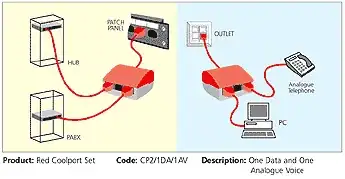
Yes, there are commercial adapters you can buy to simplify this (you don't need to make up special cables).

For example

Coolport blue Connection diagram

RedGrittyBrick
  • 81,981
  • 20
  • 135
  • 205
  • 1
    I'm sorry but I need to say that not just because there is a comercial device available on market that will certanly works.... EIA/TIA 568A don't actually approve using the same cable to telephony and ethernet aplications, but in pratice it really works. I mean, the point is, it works due to pratical evidence, not due to the existence of a comercial device. By the way, I didn't know that such thing exists, it is really useful. – Diogo Jun 25 '12 at 17:33
  • @RedGrittyBrick - Will this also have the same GigE to FastE downgrading? – Alex S Jan 08 '16 at 06:32