6

Recently Chrome started displaying very strange error messages when it cannot find a page. It's quite random, it doesn't always does it and it seems to only affect the bolded parts of the text.

If I check the code in the console, the page unscrambles itself although the letters are still randomly spaced out. Does anybody know what could be causing this? Is it a known bug?

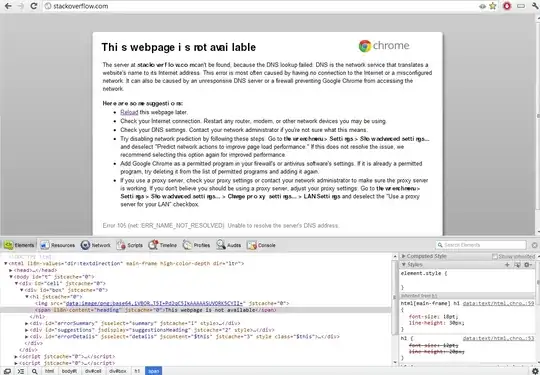
enter image description here

enter image description here

cpast
  • 2,455
  • 2
  • 19
  • 27
laurent
  • 5,979
  • 17
  • 47
  • 71
  • Have you tried disabling any Chrome Extensions you might have? Article here on starting in Safe Mode http://www.readwriteweb.com/archives/extensions_broke_your_browser_how_to_enter_safe_mo.php – DaveP Jul 30 '12 at 15:31
  • Possible duplicate: http://superuser.com/questions/423495/gibberish-when-printing-pdfs – Michael Hampton Jul 30 '12 at 16:20

3 Answers3

0

Some folks have solved similar issues by disabling Hardware Acceleration in their Chrome settings.

Head to the URL chrome://settings/?search=hardware and disable the option labeled "Use hardware acceleration when available".

Then, restart your browser.

Worked for me when I was having the same problem.


Here's an example of the problem I was having:

Here's an example of the problem I was having.


I turned this setting OFF to fix the problem:

Here's the setting that fixes the problem.


Crates
  • 111
  • 1
  • 4
0

This looks like a corrupted font. Try reinstalling the affected font.

Michael Hampton
  • 13,635
  • 4
  • 45
  • 76
0

The gibberish text could be due to Chrome's language settings. Click on Chrome -> Settings -> Show advanced settings... -> Languages and spell-checker settings. Select the language on the left pane, and click on Display Google Chrome in this language on the right pane, and click OK to apply the changes.

hanxue
  • 2,940
  • 4
  • 29
  • 53