5

Is there a way to get the wireless LED of a laptop to indicate wireless activity the way that the hard-drive LED does?

It seems to have been implemented in Ubuntu, so fortunately it can be done with software. Does anyone know of a way to get it to work in Windows?
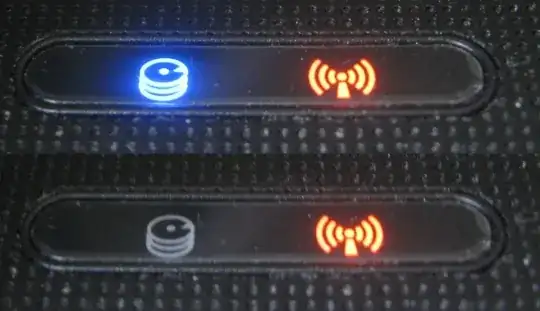
HD and Wireless LEDs

slhck
  • 223,558
  • 70
  • 607
  • 592
Synetech
  • 68,243
  • 36
  • 223
  • 356
  • 2
    I would definitely prefer to be surrounded by *less* blinking devices. – Marco Aug 01 '12 at 17:11
  • @Marco, maybe, but it provides no useful information as it is; you may as well just disable the LED altogether. – Synetech Aug 01 '12 at 17:23
  • Wow, I don't remember the last laptop I saw that still had a physical light for this (but then I deal almost exclusively with Thinkpads at the office). – Shinrai Aug 01 '12 at 17:23
  • 2
    @Synetech - And I wouldn't agree that it's no useful information - it lets you know the wireless radio is turned on (and draining your battery). It's only useless if the system doesn't provide a way to turn the wireless off. – Shinrai Aug 01 '12 at 17:24
  • I don't see much use for this information. A simple on/off is enough. When it's blinking, that just tells you that something's happening. That's not really useful unless you can tell exactly *what's* happening. – Iszi Aug 01 '12 at 17:30
  • @Shinrai, that’s not useful information because it is static and there is already an easy way to get that. I always drag a [shortcut to NIC](http://i.stack.imgur.com/8FEDi.png) to the Start Menu to give me instant access to my current network statistics. – Synetech Aug 01 '12 at 17:31
  • @Iszi, how is that any different from the HD LED, DVD LED, NIC LED, battery/charge LEDs, or even power LED? Those are exactly same and yet they are still included. It is very useful because it lets you see that *something* is happening and provides **dynamic** information; certainly much more useful than it is now, showing a static piece of information. – Synetech Aug 01 '12 at 17:34
  • @Synetech - Not all users are that savvy, mind you. :) – Shinrai Aug 01 '12 at 17:37
  • @Shinrai, I don’t know what that means, but if you are saying that it would be confusing, I would again direct you to the HD LED right beside it. (Years ago, when I had three or four 512MB drives in my system, I attached a separate LED to each one so that I could have per-drive activity indicators. Unfortunately, I only had some red, amber, and green LEDs from the cases of old computers at the time. It would have been really sweet if I had the multi-color LEDs I do now.) – Synetech Aug 01 '12 at 18:02
  • @Synetech - I meant it at face value, and I meant it on your earlier comment. "I always drag a shortcut to NIC to the Start Menu to give me instant access to my current network statistics." A lot of people don't know how to do that or that it's even possible - hence the use of the light. – Shinrai Aug 01 '12 at 18:19
  • I personally feel NIC LEDs fall under the same category as Wi-Fi LEDs in this regard. HDD LEDs, DVD LEDs, and Battery LEDs may still serve useful purposes in their blinking. The difference here being that there is a *lot* of noise in network activity. Just because a NIC or Wi-Fi LED would blink, doesn't mean it's doing anything you would have requested, expected, or even understood. HDD activity on the other hand, is mostly something even a mildly savvy end-user can anticipate and correlate to its source. – Iszi Aug 01 '12 at 18:35
  • @Shinrai, those people have no use for *any* LEDs then. They are better served with some tray icons or something they can click. `;-)` – Synetech Aug 01 '12 at 19:14
  • @Iszi, not really. When was the last time you managed to get the hard-drive LED to stop blinking for more than about 1-2 seconds? Even if you stop every service and kill every process and strip Windows down to the bare minimum (even killing Explorer), there is still activity. `:-|` Network activity on the other hand *can* be made to stop altogether (at least for a while; Windows itself likes to ping Microsoft’s servers now and then). – Synetech Aug 01 '12 at 19:17
  • @everyone.. If he wants the answer, look for it. If not, don't worry about the question and move on. Synetech, can you provide your OS and laptop model? – cutrightjm Aug 01 '12 at 19:48
  • @ekaj, *> If he wants the answer, look for it. If not, don't worry about the question and move on.*   I was thinking the same thing. I don’t know why people here put up so much resistance to questions they are not interested in.     *> can you provide your OS and laptop model?*   I’m wondering in general, but at least for a `Broadcom 802.11n Network Adapter`. – Synetech Aug 01 '12 at 20:18
  • I've been looking - but so far the closest thing I've found is Network Lights.. but that uses the ScrollLock and NumLock keys. – cutrightjm Aug 01 '12 at 20:28

1 Answers1

1

There is a how to for "influence the flashing of your laptops WiFi led" for windows found here at Boris Wach. with all do credit to Boris.

It explains and shows process in a pretty straight forward manner with screen shots.

Influence the flashing of your laptops wifi led

Carl B
  • 6,660
  • 16
  • 46
  • 66
  • 1
    That looks perfect! In fact, there are several other entries already in there that begin with `led…`, so this may in fact work. I’ve added the entry and will check if it works tomorrow after rebooting. – Synetech Aug 14 '12 at 04:45
  • Hmm, it’s not working. I thought maybe it depends on the wireless adapter/driver, but Googling it seems to indicate it applies to at least two or three different kinds of wireless adapters, so presumably it would be at least a semi-universal setting. [This post](http://forums.smallnetbuilder.com/showpost.php?s=d080bdba1d2c967a7b7a2ca54104ad13&p=19657&postcount=10) implies that some of the other pre-existing entries may be needed if `LedMode` doesn’t work, so I’ll search and experiment with those. Either way, this got me on the right track. – Synetech Aug 14 '12 at 17:20