2

I ran into an issue with my open office base file. It appears to be locked (I have file.odb and file.odb.lck). Now I can open the base file, but as soon as I select Tables it crashes on me and when I open any of the Reports, it crashes on me.

How do I unlock it? Or is it a different issue other than file lock?

Thanks!

EDIT (13.VIII.2012, 12.54) Let me add a bit more info. It's openoffice 3.4, running on Windows XP pro 32-bit OS. There is no screen shot I can get of you a crash, since as soon as I click on Table or trying to open any Reports, the file crashes and closes. I can open the file, just can't do anything to it.

EDIT (13.VIII.2012, 13.00) Here is what the .lck file holds in it:

HSQLLOCK 9 ¡&©

Let me know if that helps!

EDIT (13.VIII.2012, 16.45)

Here is the error message, I get after I try to save the file as...:

enter image description here

EDIT (14.VIII.2012, 10.01)

Hopefully, this one helps a little more:
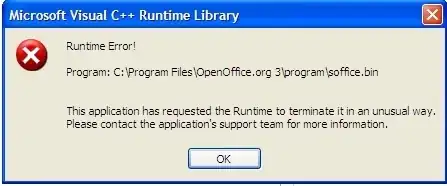
enter image description here

George
  • 324
  • 1
  • 3
  • 19
  • Please add more information about "crash" : Exact description of what you do, error messages text and if possible screenshots. – harrymc Aug 13 '12 at 17:48
  • @harrymc Can't get you a screenshot as it's closes as soon as I click on either tables or try to open a report. – George Aug 13 '12 at 17:58
  • You mean that OpenOffice itself crashes and disappears ? There may be some useful information about it in the Event Viewer (better look immediately after a crash). You could also verify if you have all permissions on the database files (renaming the .lck file is a good start). – harrymc Aug 13 '12 at 18:06
  • I believe you can simply delete the lock file. Also, it might help to know the platform/version/&c that you're running on---in order to cite the relevant docs, if nothing else. – nerdinexile Aug 13 '12 at 16:14
  • @nerdinexile No, that doesn't fix the issue. – George Aug 13 '12 at 18:00
  • One more question : What is your Java version and have you updated it just before the crash. – harrymc Aug 13 '12 at 18:14
  • @harrymc There is no event in event viewer for any instances. Actually, this particular version is Apache based. – George Aug 13 '12 at 19:34
  • The error dialog is hard to read - please post it by itself in real and readable size. But this is starting to look like your file is corrupted or is otherwise provoking a bug in Base. – harrymc Aug 14 '12 at 05:25
  • @harrymc Hopefully this screenshot helps! – George Aug 14 '12 at 15:59
  • @George: Would you be willing to post the `.odb` file online? – Mechanical snail Aug 16 '12 at 07:22
  • @Mechanicalsnail I can't, it has some work related sensitive info, sorry. – George Aug 16 '12 at 15:20
  • 2 suggestions: (1) See if it also crashes Libreoffice. (2) An `.odb` file is just a renamed zip file; try unzipping and seeing whether you can access the HSQLDB data inside, outside of OO. – Mechanical snail Aug 16 '12 at 21:28

1 Answers1

0

A wild guess is all I can do : Your database is either corrupted or something in it causes Base (not known for stability) to crash.

Assuming that your database is dead, I suggest that you try at least to recover your data.
See this tutorial : Recovering a damaged odb file.

Let me know how this recovery procedure worked for you.

harrymc
  • 455,459
  • 31
  • 526
  • 924
  • Well, I was able to follow the instructions, so thank you for providing them! However, the **script** is fine, it's **data** appears to be corrupt. I am screwed, ain't I? – George Aug 14 '12 at 19:56
  • [Googling](https://www.google.com/search?q=(Recover+OR+repair)+damaged+odb&btnG=Search&oe=utf-8&rls=org.mozilla%3Aen-US%3Aofficial&client=firefox-a&channel=rcs) finds some repair products for odb files. However, they are all commercial although with trials available and some with money-back guarantee (for what's worth). I cannot recommend any of them since I never had this problem (never used OO). You could also try an [alternative free suite](http://www.pcworld.com/businesscenter/article/218394/microsoft_office_alternatives_productivity_software_showdown.html) and try to import your data. – harrymc Aug 15 '12 at 05:47
  • ... for example [LibreOffice](http://www.libreoffice.org/) can probably open your database and might not suffer from the same bug. Google Docs may also be able to import your database. – harrymc Aug 16 '12 at 07:49
  • I tried LibreOffice and it didn't work either. I'll try google docs next, thanks! – George Aug 16 '12 at 15:46
  • In addition : IBM Lotus Symphony is based on OO, Zoho supports OO formats. – harrymc Aug 16 '12 at 16:03